• Skip to primary navigation
  • Skip to main content
  • Skip to primary sidebar

StoryToGo

Exploring storytelling in its many forms in this digital age

  • Our Story
    • Our Creatives
    • Join the StoryToGo Community
  • Community Resources
    • Web Monetization Guide
      • Web Monetization Resource Library
        • Web Monetization Tutorials
        • Web Monetization Research Papers
        • Interviews and Case Studies on Web Monetized Projects
      • Web Monetized Content Library
        • Web Monetized Courses
        • Web Monetized Podcasts
        • Web Monetized Social Networking Platforms
    • Podcasting with my Cat
      • Sustainable Funding Series Vlogcast
      • Encounters in EdTech Podcast
      • The Creative Farm Podcast
      • Boma Global Studios Podcast
    • Job Board
    • Storytelling Case Studies
  • Digital Magazine
    • Accessibility
    • Art Therapy
    • Blogging
    • Case Studies
      • Analyst Report
      • Extended Reality
      • Sustainable Funding
    • Community Building
    • EdTech
    • Gaming
    • Immersive and Interactive Media
      • XR
    • Performance Arts
      • Acting
    • Social Media
    • Storytellers
      • Alex Charters
      • Bjorn Yearwood
      • Erica Hargreave
      • Henry Hargreave
      • Jennifer Rose Garcia
      • Lori Yearwood
      • Mary McDonald
    • Tech Tips
    • Web Monetization
  • Professional Development
  • Calendar
  • Contact

Erica Hargreave

How a Simple Story from Canadian PM Carney at the World Economic Forum Can Change the World

January 21, 2026 by Erica Hargreave Leave a Comment

Canadian Prime Minister Mark Carney speaking to the 2026 World Economic Forum

Yesterday, I suspect we witnessed Canadian Prime Minister Mark Carney give a speech at the World Economic Forum that will go down in history, and be seen as a pivotal and catalysing moment in Canada standing up to the bully next door in what are dark days.

The reason I share this here is as Prime Minister Carney did this by sharing a simple story. He shared a story from Czech dissident Václav Havel, about how it just takes one shopkeeper removing the sign of compliance towards what people know to be false (but share to get along), to begin to crack the illusion. 

He then carried aspects of that story throughout the rest of his speech, telling the world that Canada has removed our sign of compliance and announced we have “Boots on the ICE”, both in defence of our sovereignty and of Greenland’s. Going on to invite others to join us in pulling down their signs of compliance, and stop pandering to the schoolyard bully. 

This made me incredibly proud as a Canadian, and although it felt like it was a long time in coming, it was probably done at the right time to have the greatest impact in catalysing positive change in the world. As we have now reached the point of time in which no well meaning person can deny that the damage being done by the bully is completely out of hand and escalating in ever increasingly dangerous, greedy and cruel ways.  In Davos, Switzerland, this speech earned Prime Minister Carney a standing ovation in the room, and this morning I woke up to discover my social media full of people from around the world applauding Prime Minister Carney and reminding Canada that we should be proud of our PM.

Take a listen, and think about how when a story is used cleverly and with heart (as that was certainly part of what carried the impact in Prime Minister Carney sharing it), it has the power to change the world.


Transcript of Prime Minister Mark Carney’s 2026 World Economic Forum Speech

For those of you, who like me, want a transcript of Canadian Prime Minister Mark Carney’s 2026 World Economic Forum Speech to pull quotes from, please find it below.

Canadian Prime Minister Mark Carney speaking to the 2026 World Economic Forum.

“It’s a pleasure – and a duty – to be with you at this turning point for Canada and for the world.

Today, I’ll talk about the rupture in the world order, the end of a nice story, and the beginning of a brutal reality where geopolitics among the great powers is not subject to any constraints.

But I also submit to you that other countries, particularly middle powers like Canada, are not powerless. They have the capacity to build a new order that embodies our values, like respect for human rights, sustainable development, solidarity, sovereignty, and territorial integrity of states.

The power of the less powerful begins with honesty.

Every day we are reminded that we live in an era of great power rivalry. That the rules-based order is fading. That the strong do what they can, and the weak suffer what they must.

This aphorism of Thucydides is presented as inevitable – the natural logic of international relations reasserting itself. And faced with this logic, there is a strong tendency for countries to go along to get along. To accommodate. To avoid trouble. To hope that compliance will buy safety.

It won’t.

So, what are our options?

In 1978, the Czech dissident Václav Havel wrote an essay called The Power of the Powerless. In it, he asked a simple question: how did the communist system sustain itself?

His answer began with a greengrocer. Every morning, this shopkeeper places a sign in his window: “Workers of the world, unite!” He does not believe it. No one believes it. But he places the sign anyway – to avoid trouble, to signal compliance, to get along. And because every shopkeeper on every street does the same, the system persists.

Not through violence alone, but through the participation of ordinary people in rituals they privately know to be false.

Havel called this “living within a lie.” The system’s power comes not from its truth but from everyone’s willingness to perform as if it were true. And its fragility comes from the same source: when even one person stops performing — when the greengrocer removes his sign — the illusion begins to crack.

It is time for companies and countries to take their signs down.

For decades, countries like Canada prospered under what we called the rules-based international order. We joined its institutions, praised its principles, and benefited from its predictability. We could pursue values-based foreign policies under its protection.

We knew the story of the international rules-based order was partially false. That the strongest would exempt themselves when convenient. That trade rules were enforced asymmetrically. And that international law applied with varying rigour depending on the identity of the accused or the victim.

This fiction was useful, and American hegemony, in particular, helped provide public goods: open sea lanes, a stable financial system, collective security, and support for frameworks for resolving disputes.

So, we placed the sign in the window. We participated in the rituals. And largely avoided calling out the gaps between rhetoric and reality.

This bargain no longer works.

Let me be direct: we are in the midst of a rupture, not a transition.

Over the past two decades, a series of crises in finance, health, energy, and geopolitics laid bare the risks of extreme global integration.

More recently, great powers began using economic integration as weapons. Tariffs as leverage. Financial infrastructure as coercion. Supply chains as vulnerabilities to be exploited.

You cannot “live within the lie” of mutual benefit through integration when integration becomes the source of your subordination.

The multilateral institutions on which middle powers relied— the WTO, the UN, the COP – the architecture of collective problem solving – are greatly diminished.

As a result, many countries are drawing the same conclusions. They must develop greater strategic autonomy: in energy, food, critical minerals, in finance, and supply chains.

This impulse is understandable. A country that cannot feed itself, fuel itself, or defend itself has few options. When the rules no longer protect you, you must protect yourself.

But let us be clear-eyed about where this leads. A world of fortresses will be poorer, more fragile, and less sustainable.

And there is another truth: if great powers abandon even the pretence of rules and values for the unhindered pursuit of their power and interests, the gains from “transactionalism” become harder to replicate. Hegemons cannot continually monetize their relationships.

Allies will diversify to hedge against uncertainty. Buy insurance. Increase options. This rebuilds sovereignty – sovereignty that was once grounded in rules, but will be increasingly anchored in the ability to withstand pressure.

As I said, such classic risk management comes at a price, but that cost of strategic autonomy, of sovereignty, can also be shared. Collective investments in resilience are cheaper than everyone building their own fortress. Shared standards reduce fragmentation. Complementarities are positive sum.

The question for middle powers, like Canada, is not whether to adapt to this new reality. We must. The question is whether we adapt by simply building higher walls – or whether we can do something more ambitious.

Canada was amongst the first to hear the wake-up call, leading us to fundamentally shift our strategic posture.

Canadians know that our old, comfortable assumption that our geography and alliance memberships automatically conferred prosperity and security is no longer valid.

Our new approach rests on what Alexander Stubb has termed “values-based realism” – or, to put it another way, we aim to be principled and pragmatic.

Principled in our commitment to fundamental values: sovereignty and territorial integrity, the prohibition of the use of force except when consistent with the UN Charter, respect for human rights.

Pragmatic in recognising that progress is often incremental, that interests diverge, that not every partner shares our values. We are engaging broadly, strategically, with open eyes. We actively take on the world as it is, not wait for a world we wish to be.

Canada is calibrating our relationships so their depth reflects our values. We are prioritising broad engagement to maximise our influence, given the fluidity of the world order, the risks that this poses, and the stakes for what comes next.

We are no longer relying on just the strength of our values, but also on the value of our strength.

We are building that strength at home.

Since my government took office, we have cut taxes on incomes, capital gains and business investment, we have removed all federal barriers to interprovincial trade, and we are fast-tracking a trillion dollars of investment in energy, AI, critical minerals, new trade corridors, and beyond.

We are doubling our defence spending by 2030 and are doing so in ways that builds our domestic industries.

We are rapidly diversifying abroad. We have agreed a comprehensive strategic partnership with the European Union, including joining SAFE, Europe’s defence procurement arrangements.

We have signed twelve other trade and security deals on four continents in the last six months.

In the past few days, we have concluded new strategic partnerships with China and Qatar.

We are negotiating free trade pacts with India, ASEAN, Thailand, Philippines, Mercosur.

To help solve global problems, we are pursuing variable geometry— different coalitions for different issues, based on values and interests.

On Ukraine, we are a core member of the Coalition of the Willing and one of the largest per-capita contributors to its defence and security.

On Arctic sovereignty, we stand firmly with Greenland and Denmark and fully support their unique right to determine Greenland’s future. Our commitment to Article 5 is unwavering.

We are working with our NATO allies (including the Nordic Baltic 😎 to further secure the alliance’s northern and western flanks, including through Canada’s unprecedented investments in over-the-horizon radar, submarines, aircraft, and boots on the ground. Canada strongly opposes tariffs over Greenland and calls for focused talks to achieve shared objectives of security and prosperity for the Arctic.

On plurilateral trade, we are championing efforts to build a bridge between the Trans-Pacific Partnership and the European Union, creating a new trading block of 1.5 billion people.

On critical minerals, we are forming buyer’s clubs anchored in the G7 so that the world can diversify away from concentrated supply.

On AI, we are cooperating with like-minded democracies to ensure we will not ultimately be forced to choose between hegemons and hyperscalers.

This is not naive multilateralism. Nor is it relying on diminished institutions. It is building the coalitions that work, issue by issue, with partners who share enough common ground to act together. In some cases, this will be the vast majority of nations.

And it is creating a dense web of connections across trade, investment, culture on which we can draw for future challenges and opportunities.

Middle powers must act together because if you are not at the table, you are on the menu.

Great powers can afford to go it alone. They have the market size, the military capacity, the leverage to dictate terms. Middle powers do not. But when we only negotiate bilaterally with a hegemon, we negotiate from weakness. We accept what is offered. We compete with each other to be the most accommodating.

This is not sovereignty. It is the performance of sovereignty while accepting subordination.

In a world of great power rivalry, the countries in between have a choice: to compete with each other for favour or to combine to create a third path with impact.

We should not allow the rise of hard power to blind us to the fact that the power of legitimacy, integrity, and rules will remain strong — if we choose to wield it together.

Which brings me back to Havel.

What would it mean for middle powers to “live in truth”?

It means naming reality. Stop invoking the “rules-based international order” as though it still functions as advertised. Call the system what it is: a period of intensifying great power rivalry, where the most powerful pursue their interests using economic integration as a weapon of coercion.

It means acting consistently. Apply the same standards to allies and rivals. When middle powers criticise economic intimidation from one direction but stay silent when it comes from another, we are keeping the sign in the window.

It means building what we claim to believe in. Rather than waiting for the old order to be restored, create institutions and agreements that function as described.

And it means reducing the leverage that enables coercion. Building a strong domestic economy should always be every government’s priority. Diversification internationally is not just economic prudence; it is the material foundation for honest foreign policy. Countries earn the right to principled stands by reducing their vulnerability to retaliation.

Canada has what the world wants. We are an energy superpower. We hold vast reserves of critical minerals. We have the most educated population in the world. Our pension funds are amongst the world’s largest and most sophisticated investors. We have capital, talent, and a government with the immense fiscal capacity to act decisively.

And we have the values to which many others aspire.

Canada is a pluralistic society that works. Our public square is loud, diverse, and free. Canadians remain committed to sustainability.

We are a stable, reliable partner—in a world that is anything but—a partner that builds and values relationships for the long term.

Canada has something else: a recognition of what is happening and a determination to act accordingly.

We understand that this rupture calls for more than adaptation. It calls for honesty about the world as it is.

We are taking the sign out of the window.

The old order is not coming back. We should not mourn it. Nostalgia is not a strategy.

But from the fracture, we can build something better, stronger, and more just.

This is the task of the middle powers, who have the most to lose from a world of fortresses and the most to gain from a world of genuine cooperation.

The powerful have their power. But we have something too – the capacity to stop pretending, to name reality, to build our strength at home, and to act together.

That is Canada’s path. We choose it openly and confidently.

And it is a path wide open to any country willing to take it with us.”

Filed Under: #StoryToGo, Community Building, Erica Hargreave, Events, Storytellers Tagged With: power of story, storytelling

OpusClip: Creating Reels and YouTube Shorts from Podcasts and Long Form Video

July 17, 2025 by Erica Hargreave Leave a Comment

Streamlining Reel Creation from Podcasts & Long Form Videos with Ai

In researching AI tools to save time in creating reels and video shorts from our podcasts and long form video, OpusClip stands out as a time saving solution, as it gives us the ability to further edit and fine tune the reels and video shorts it produces.

I am a creative soul and storyteller through and through, so the idea of using AI to create for me holds no appeal. Why would I want AI to do for me what I love, without the uniqueness, whimsy and humanity that I bring to it. Just like with Persian rugs whose artists purposefully add in an imperfect stitch to demonstrate that they are handmade, I feel that the unique style that my dyslexic and individual mind brings to my writing is what creates the beauty and interest in my storytelling.

Exploring Ethical Ways of Using AI to Repurpose My Creative Content

Streamlining Reel Creation from Podcasts  & Long Form Videos with Ai

For me, where AI is useful is in saving time and doing things I don’t enjoy, or that may create a solution to a problem for me. This is where as a media and journalism instructor, and journalist in my own right, I am exploring AI. How can I use AI to further share stories of my creation that matter and spread messages of social good further? How can I utilise AI to save me time, allowing me to focus on the creative? How can I use AI ethically? How can I utilise AI in an environmentally conscious manner?

I don’t have the answers to all of the above yet, but I am experimenting so as to begin to explore and shape my thoughts and experience around this for sharing in my courses with my students and encouraging such discussions among them. In starting on that journey, I wanted to explore if there was a way that AI could help me edit content in the form of podcasts and long form video I’d already created into video reels and YouTube Shorts. This being something I knew would be beneficial in my storytelling, but that I simply had limited time to do.

Roamancing Travel and Culture Shorts

This lead me to experiment with a number of AI tools to create video reels and YouTube shorts from our Roamancing Reads Podcast in June 2025. While I found a few tools that would cut my podcasts and longer form video into a series of video reels and YouTube shorts, many of these did not allow to further edit the video reels, leaving me unsatisfied with the outcome and not interested in publishing the resulting reels. In searching solutions for this, I found OpusClip.

As an example, here is one reel that OpusClip helped to cut together from our Roamancing Reads Podcast on Triton and Brighton, Newfoundland and Labrador.

@ericahargreave Vinegar Jam Pie! The BEST Dessert You've Never Tried from Newfoundland and Labrador! You heard me right, Vinegar Jam Pie … and it gets weirder when they began to explain how it is made with the Vinegar Jelly Plant grown in a jar in the grandmother's kitchen. Full disclosure, it was quite #scrumpdillyocious! But then that is Triton and Brighton, Newfoundland for you – deliciously unique. A #ShoutOut of thanks to @opusclip for helping me craft this mini tale from our longer #podcast on Triton and Brighton, Newfoundland. I am loving how #OpusClip finds and helps me to cut together smaller stories from a big podcast, saving me hours upon hours that I do not have, making it possible to craft #shorts in a fraction of the time. #OpusClipandGrow For more stories from #Triton and #Brighton, #Newfoundland, tune into the full Roamancing Reads podcast: https://youtu.be/LznfHOSjlkg and read on with my article in Roamancing Travel & Culture Magazine: https://roamancing.com/2024/08/triton-brighton-newfoundland/ #ExploreCanada #ExploreNL #OnlyInNewfoundland #NewfoundlandAndLabrador #TritonNL #BrightonNL #VinegarJam #VinegarJamPie #NewfoundlandFood #Foodie #FoodieTravel #createdwithopusclip ♬ original sound – 🇨🇦 Erica Hargreave 🇨🇦 – Travel & Storytelling w/ Erica

Why OpusClip for Creating Reels and YouTube Shorts from Podcasts and Long Form Video

I found the solution for creating reels and YouTube shorts from my podcasts and long form video that works for me with OpusClip.

Dropping a long form video into OpusClip.

Why Do I Like OpusClip?

  • OpusClip cuts together mini stories from our longer form video, that make sense.
  • The platform makes it easy to edit the mini stories they create from our long form video.
  • It uses AI SEO research to suggest titles for the mini stories they create.
  • Provides AI SEO research to give us an idea of which mini stories are likely to take off online, and which reels include trending topics.
  • It creates a transcript of our podcasts or long form video.
Try OpusClip for Free

OpusClip Creates Reels / Shorts from Podcasts & Long Form Video with a Click

I’ve known that I should be sharing reels / shorts as teasers to our podcasts and longer form video for a long time now, but I never seems to have enough time in my day to put aside for that. Discovering that OpusClip could create several for me at the click of a button has now made this possible.

This is how easy it is:

  • Paste your video link from a podcast or other long form video into OpusClip.
Paste your video link from a podcast or other long form video into OpusClip.
  • Review the reels / shorts that OpusClip cuts together from your content to determine which have potential.
OpusClip created reels from Roamancing Reads Alcatraz Island History Podcast

OpusClip Makes It Easy to Edit Reels / Shorts

The reason why OpusClip works for me is that they make it both possible and easy for me to edit the reels / video shorts that they create from my podcasts or other long form videos. Without the ability to make my own edits, OpusClip would be useless to me, as there will always be ways I want to fine tune my reels and shorts to make sure they reflect the stories my team and I wish to share in the manner we wish to share. This includes:

  • Editing the text transcript they display on the screen.
Editing the Transcript in OpusClip
  • Changing the highlighted colours on the on-screen transcript.
Changing the highlighted colours on the on-screen transcript in OpusClip.
  • Adding additional clips to the mini stories that OpusClip cut together, or cutting out clips.
Adding additional clips to the mini stories that OpusClip cuts together.
  • Uploading your own images and video to edit and replace the images and video in the reel / video short that OpusClip cut.
Uploading your own images and video to edit and replace the images and video in the reel / short that OpusClip cut.
  • Replacing the audio.
  • Uploading and adding background music to the reel / video short.
Music in Opus Clip
  • Add transitions to the reel / video short..
Transitions in OpusClip

AI SEO Researched Titles

While I always modify the AI SEO researched titles that OpusClip comes up with to ensure that it accurately describes the video, do not mislead, includes my desired keywords (that I’ve done my own SEO research on), I do like that OpusClip’s suggested titles are giving me ideas and encouraging me to craft my titles in new ways to draw the attention of potential viewers.

AI SEO Research to Suggest Popularity Potential of Reels / Video Shorts

I select which of the reels / video shorts, that OpusClip creates, I am using and when, based on what makes sense in our storytelling, but I find OpusClip’s suggestions for popularity potential of reels / shorts, based on AI SEO research to be interesting. I am not sure how accurate these suggestions are, however, as two of our best performing OpusClip created reels / shorts had lower popularity potential in OpusClip’s ranking suggestions.

AI SEO Rankings in OpusClip

OpusClip Creates Transcripts

An added bonus of importing podcasts and long form video into OpusClip is that it creates transcript of that video that you can then use to update your transcript on your podcast and long form video. Just be sure to proofread it, as with many automatic transcribers, it makes mistakes.

Downloading transcripts of long form video in OpusClip.

While OpusClip does not create a transcript of the reels / shorts it creates, you can easily create one yourself by copying and pasting the onscreen transcripts they create as a part of your reel / short video.

Copying and pasting the onscreen transcripts they create as a part of your reel and short video.

Tools That I Do Not Use at Present

At present, I am not using the following tools that OpusClip provides, as I don’t like the resulting product that they create:

  • AI Enhance
    • I find when I try applying this to the audio, it usually makes the audio worse.
  • AI Hooks
    • This feature uses AI generated voices, which always make me cringe.
  • B-Roll
    • This is autogenerated and selects images and video that makes the reel / video shorts look autogenerated, weaving in imagery that doesn’t match the rest of the video, that is often at odds with what is actually being discussed in the video, and removes the authentic feel from the video.
  • Music
    • I find the current selection does not match my storytelling, and the search isn’t bringing up options that would add anything to my reels / shorts, leaving me disappointed.

Wish List

  • The ability to trim uploaded video at the beginning of the video, as well as at the end of the video, when making edits to reels / video shorts.
  • Downloadable transcripts for OpusClip created reels / video shorts.
  • Ability to rerecord audio on reels / video shorts within OpusClip.
  • Enable addition of self-recorded hooks.
  • Expand upon the music library and improve on its searchability.

Try OpusClip For Yourself

While these are my experiences and opinions, give OpusClip a try by experimenting with their free trial.

Try OpusClip for Free

What Are Your OpusClip Highlights & Wishes?

We’d love to hear what you like about OpusClip in the comments below, and your wishes for it in the future. Also if you have tips and tricks to editing with OpusClip and getting the most out of it, don’t be shy, feel free to share those too.


Disclaimer: There are affiliate links in this post. If you make a purchase after clicking on one of these links, we may receive a small commission at no extra cost to you. This commission contributes to paying our writers for their storytelling. We only post links to things that we ourselves have tried.

Filed Under: #StoryToGo, AI, Erica Hargreave, Filmmaking, Storytellers, Tech Tips Tagged With: AI for filmmaking, AI for videography, filmmaking

Submitting to the 2024 TMAC Membership and Chapter Awards on FilmFreeway

March 14, 2025 by Erica Hargreave Leave a Comment

Will Tang wins 1st place in the 2021 Nathan Fong Award

We are excited to launch the 2024 TMAC Membership and Chapter Awards on FilmFreeway, an awards submission platform that will help to streamline our submissions and judging.

Will Tang wins 1st place in the 2021 Nathan Fong Award

As the submission process will be new for the TMAC Membership and Chapter Awards, we have created the tutorial below to walk you through this process.

Guide to Entering the TMAC Membership and Chapter Awards on FilmFreeway

You will find the 2024 TMAC Membership and Chapter Awards on FilmFreeway at https://filmfreeway.com/TMACAwards.

TMAC Awards on FilmFreeway

In this Guide, we share instructions on:

  • Creating an Account on FilmFreeway
  • Adding Your Project for the:
    • Nathan Fong Memorial Award
    • TMAC Conference Host Destination Award: Newfoundland & Labrador
    • People’s Choice Photo of the Year
    • Volunteer of the Year
    • Industry Member of the Year Award
    • Industry Award for Best Itinerary of the Year
  • Submitting Your Projects to the TMAC Awards

Create an Account on FilmFreeway

To enter the 2024 TMAC Membership and Chapter Awards or nominate someone for an award, you will need an account on FilmFreeway. This is free. Just click ‘Sign Up’ on the Header Menu (or ‘Log In’, if you already have a FilmFreeway account).

Sign Up for the TMAC Awards on FilmFreeway

In signing up, be sure to select “I want to submit my work or get tickets to festivals.”

Select "I want to submit my work or get tickets to festivals."

Once you are signed into FilmFreeway, click on the downward arrow beside your avatar in the Header Menu and click on Account Settings.

Navigating to Account Settings on FilmFreeway

While you will not be charged anything for entering and nominating people to the TMAC Membership and Chapter Awards, if you are using FilmFreeway for any other awards, you way wish to scroll down to Currency and change your currency to Canadian dollars.

Change the Currency You Are Paying in on FilmFreeway

Next:

  • Add Your Project for the:
    • Nathan Fong Memorial Award
    • TMAC Conference Host Destination Award: Newfoundland & Labrador
    • People’s Choice Photo of the Year
    • Volunteer of the Year
    • Industry Member of the Year Award
    • Industry Award for Best Itinerary of the Year
  • Submit Your Projects to the TMAC Awards

Add ‘Your Projects’

Before you enter an Awards Category, you need to ‘Add Your Projects’ to your FilmFreeway Portfolio. By ‘Projects’ this refers to the stories, photos or nominations you wish to submit to the 2024 TMAC Membership and Chapter Awards.

Add A Project on FilmFreeway

Before starting, you will want to visit TMAC’s Website and review the 2024 TMAC Membership and Chapter Awards to decide which categories you wish to enter.

*Please Note: if you are submitting a story or photo that you previously submitted to the TMAC National Awards, you DO NOT need to create this ‘project’ again in FilmFreeway, but instead can jump ahead to Submit Your Projects to the TMAC Awards, and submit your previously created ‘project’ to the desired awards category.

Nathan Fong Memorial Award

The Nathan Fong Award, which is open to all TMAC members across Canada, was created to raise awareness and highlight the many contributions Canadians of Asian descent have made to Canada. Stories submitted for this award can be inspired by anything from the best places to eat in Chinatown to historical places of interest, to modern-day attractions, culture, festivals, unusual distilleries, chef profiles and more. The stories must include both an Asian and Canadian connection.

All forms of media storytelling are welcome in this category, from the written word to podcasts, video, immersive and interactive media.

Submission Guidelines/Criteria:

  • Submission time frame for this award welcomes works published between January 1, 2024 to the submissions deadline of April 4, 2025.
  • TMAC members may submit up to 2 entries.
  • You can use work that you have already submitted for the TMAC National Awards.

For projects that you intend to enter into the Nathan Fong Memorial Award, follow these steps:

  • Fill in the Project Information with:
    • Project Type: Select Film / Video or Script (for Written Projects) or Music (for Audio Projects) or Photography / Design or VR / XR / Immersive, depending on what best suits your project.
    • Project Title: The name of the story that you are submitting.
    • Brief Synopsis: Tell us the Publication Outlet and Date of Publication of your story.
    • If your project is in French, click on the “My Project also has a non-English Title and Synopsis” box, and fill in the Project Title en Francais.
    • Add a link to your story (optional).
  • Below you will see an example of the choices for Film / Video.
TMAC All Forms of Media Project Information on FilmFreeway
  • There is nothing you need to do with the Submitter’s Information, aside from making sure that it includes the same email as your login for TMAC’s website.
  • Under Credits, add the names of your project’s main creatives.
All Forms of Media Credits on FilmFreeway
  • Select whichever Project Type fits under Specifications.
  • On Specifications fill in the Publication Date instead of the Completion Date.
  • You don’t need to fill in anything else on Specifications, but you can if you wish to.
All Forms of Media Specifications on FilmFreeway
  • Ignore the Screening / Distribution Section and click Save Project.
  • You must upload a PDF, under Files & Attachments with a description of the project, form of media, and a link to it (if it is online). This is a requirement for all Nathan Fong Memorial Award Submissions.
Add PDFs and Photos on FilmFreeway
  • Additionally, please include one of the following:
    • Under Add an Online Screener, upload a video under Upload.
    • Under Add an Online Screener, add a Link to your story. This can be a link to any form of media.
    • Under Upload Script File, upload a PDF of an article, blog post, book, or other form of media.
    • Under Upload Photographs, add any photos that you are submitting as your story.
  • If you are having trouble creating a PDF of a web based article, I shared instructions on how to do that in the TMAC Facebook Group. Not a member there, email me at [email protected] and I will send you the tips I posted to the Facebook Group.
Add Your Video or Project Link on Film Freeway
  • Congratulations! You have added everything needed for this Award Submission.
  • Now click on ‘My Projects’ in the Header Menu to add your next story, photo or nomination:
    • Nathan Fong Memorial Award
    • TMAC Conference Host Destination Award: Newfoundland & Labrador
    • People’s Choice Photo of the Year
    • Volunteer of the Year
    • Industry Member of the Year Award
    • Industry Award for Best Itinerary of the Year
  • Or scroll down in this article to Submit Your Project to an Award to finish the submission process.

TMAC Conference Host Destination Award: Newfoundland & Labrador

All media delegates of the 2024 TMAC Conference & Media Marketplace in St John’s, are invited to submit your stories, published on any platform / communication channel, about your experiences while in Newfoundland & Labrador.

Submission Guidelines/Criteria:

  • Submission time frame for this award welcomes works published from June 2024 to the submissions deadline of April 4, 2025.
  • TMAC members may submit unlimited entries.
  • You can use work that you have already submitted for the TMAC National Awards.

For projects that you intend to enter into the TMAC Conference Host Destination Award: Newfoundland & Labrador, follow these steps:

  • Fill in the Project Information with:
    • Project Type: Select Film / Video or Script (for Written Projects) or Music (for Audio Projects) or Photography / Design or VR / XR / Immersive, depending on what best suits your project.
    • Project Title: The name of the story that you are submitting.
    • Brief Synopsis: Tell us the Publication Outlet and Date of Publication of your story.
    • If your project is in French, click on the “My Project also has a non-English Title and Synopsis” box, and fill in the Project Title en Francais.
    • Add a link to your story (optional).
  • Below you will see an example of the choices for Film / Video.
TMAC All Forms of Media Project Information on FilmFreeway
  • There is nothing you need to do with the Submitter’s Information, aside from making sure that it includes the same email as your login for TMAC’s website.
  • Under Credits, add the names of your project’s main creatives.
All Forms of Media Credits on FilmFreeway
  • Select whichever Project Type fits under Specifications.
  • On Specifications fill in the Publication Date instead of the Completion Date.
  • You don’t need to fill in anything else on Specifications, but you can if you wish to.
All Forms of Media Specifications on FilmFreeway
  • Ignore the Screening / Distribution Section and click Save Project.
  • You must upload a PDF, under Files & Attachments with a description of the project, form of media, and a link to it (if it is online). This is a requirement for all TMAC Conference Host Destination Award: Newfoundland & Labrador Awards Submissions.
Add PDFs and Photos on FilmFreeway
  • Additionally, please include one of the following:
    • Under Add an Online Screener, upload a video under Upload.
    • Under Add an Online Screener, add a Link to your story. This can be a link to any form of media.
    • Under Upload Script File, upload a PDF of an article, blog post, book, or other form of media.
    • Under Upload Photographs, add any photos that you are submitting as your story.
  • If you are having trouble creating a PDF of a web based article, I shared instructions on how to do that in the TMAC Facebook Group. Not a member there, email me at [email protected] and I will send you the tips I posted to the Facebook Group.
Add Your Video or Project Link on Film Freeway
  • Congratulations! You have added everything needed for this Award Submission.
  • Now click on ‘My Projects’ in the Header Menu to add your next story, photo or nomination:
    • Nathan Fong Memorial Award
    • TMAC Conference Host Destination Award: Newfoundland & Labrador
    • People’s Choice Photo of the Year
    • Volunteer of the Year
    • Industry Member of the Year Award
    • Industry Award for Best Itinerary of the Year
  • Or scroll down in this article to Submit Your Project to an Award to finish the submission process.

People’s Choice Photo of the Year

The always popular People’s Choice Photo of the Year invites you to share your favourite photo from 2024. Your photo can be of anything you like, but the goal is to wow your colleagues and earn their votes.

Submission Guidelines/Criteria:

  • This award welcomes photos shot in 2024.
  • Only one photo per member is permitted.
  • Photos do not need to have been published.
  • All TMAC members and staff may submit a photo.
  • You can use work that you have already submitted to the TMAC National Awards.

For photographs that you intend to enter into People’s Choice Photo of the Year, follow these steps:

  • Fill in the Project Information with:
    • Project Type: Photography / Design
    • Project Title: The name of the photograph
    • Brief Synopsis: Where the photograph was taken and the date that you took the photo.
TMAC Photography Project Information on FilmFreeway
  • There is nothing you need to do with the Submitter’s Information, aside from making sure that it includes the same email as your login for TMAC’s website.
  • Under Credits, add your name as the photographer.
Photographer Credits on FilmFreeway
  • On Specifications fill in the date the photograph was taken.
  • You don’t need to fill in anything else on Specifications, but you can if you wish to.
Photography Specifications on FilmFreeway
  • Ignore the Past Awards Section and click Save Project.
  • Upload Photographs. This is a requirement for all People’s Choice Photo of the Year Submissions.
Upload your Photographs on FilmFreeway
  • Congratulations! You have added everything needed for your People’s Choice Photo of the Year Submission.
  • Now click on ‘My Projects’ in the Header Menu to add your next story, photo or nomination:
    • Nathan Fong Memorial Award
    • TMAC Conference Host Destination Award: Newfoundland & Labrador
    • People’s Choice Photo of the Year
    • Volunteer of the Year
    • Industry Member of the Year Award
    • Industry Award for Best Itinerary of the Year
  • Or scroll down in this article to Submit Your Project to an Award to finish the submission process.

Volunteer of the Year

The Volunteer of the Year award is presented to an outstanding TMAC member, in good standing, who has demonstrated an instrumental role as a volunteer, including dedication, leadership and commitment to service and support of the association.

Submission Guidelines/Criteria:

  • This award is open to both media and industry volunteers.
  • Any member may make a nomination.
  • Nominee should be a champion for TMAC and a positive representative of the association.
  • Nominee must have been a member of TMAC for at least 12 months.
  • Nominee should make a significant impact on the work TMAC does by taking initiative to create professional development opportunities, foster industry connections, propel TMAC to be more inclusive, open or forward-thinking or contribute to the general management of TMAC as a professional organization.
  • There should be something unique about the work the nominee does, the way they do it or their overall attitude that sets them apart from other volunteers.

Please submit your TMAC volunteer nominee’s name along with a 75 to 250-word explanation as to why you’re nominating this outstanding member.

For nominations that you intend to make to the Volunteer of the Year, follow these steps:

  • Fill in the Project Information with:
    • Project Type: Script
    • Project Title: Nominee’s Name
    • Brief Synopsis: Share an introductory synopsis as to why you are nominating this individual. (optional)
Adding a Nominee as a Project on FilmFreeway
  • There is nothing you need to do with the Submitter’s Information, aside from making sure that it includes the same email as your login for TMAC’s website.
  • Select ‘Other’ under Project Type on Specifications.
Project Type on FilmFreeway
  • Ignore the Past Awards Section and click Save Project.
  • Under Upload Script File, select ‘No’ for “Does your script file include a cover page?” and then click ‘Choose File’ to upload a PDF copy of your 75 to 250-word explanation as to why you’re nominating this outstanding member. This is a requirement for all Volunteer of the Year Nominee Submissions.
Upload article on FilmFreeway
  • Congratulations! You have added everything needed for this Nomination.
  • Now click on ‘My Projects’ in the Header Menu to add your next story, photo or nomination:
    • Nathan Fong Memorial Award
    • TMAC Conference Host Destination Award: Newfoundland & Labrador
    • People’s Choice Photo of the Year
    • Volunteer of the Year
    • Industry Member of the Year Award
    • Industry Award for Best Itinerary of the Year
  • Or scroll down in this article to Submit Your Project to an Award to finish the submission process.

Industry Member of the Year Award

The Industry Member of the Year award is presented to a TMAC industry member who distinguishes themselves as a highly skilled and respected colleague to both industry and media members.

This award highlights the work of a member who consistently demonstrates excellence. This industry member shows a deep understanding of and appreciation for the ever-changing needs of travel media. Nominees have a track record for developing unique story opportunities, facilitating successful partnerships and collaborations, curating tailored itineraries, and connecting media with expert voices. In other words, this is the industry member EVERYONE raves about.

Submission Guidelines/Criteria:

  • Nominations are welcome from both TMAC media and industry members.
  • Multiple nomination submissions are welcome.
  • Industry may not self-nominate for this category.

Please submit your TMAC nominee’s name and position, along with a 50 to 250-word explanation as to why you’re nominating this outstanding industry member.

For nominations that you intend to make to the Industry Member of the Year Award, follow these steps:

  • Fill in the Project Information with:
    • Project Type: Script
    • Project Title: Nominee’s Name
    • Brief Synopsis: Share an introductory synopsis as to why you are nominating this individual. (optional)
Adding a Nominee as a Project on FilmFreeway
  • There is nothing you need to do with the Submitter’s Information, aside from making sure that it includes the same email as your login for TMAC’s website.
  • Select ‘Other’ under Project Type on Specifications.
Project Type on FilmFreeway
  • Ignore the Past Awards Section and click Save Project.
  • Under Upload Script File, select ‘No’ for “Does your script file include a cover page?” and then click ‘Choose File’ to upload a PDF copy of your 50 to 250-word explanation as to why you are nominating this outstanding industry member. This is a requirement for all Industry Member of the Year Nominee Submissions.
Upload article on FilmFreeway
  • Congratulations! You have added everything needed for this Nomination.
  • Now click on ‘My Projects’ in the Header Menu to add your next story, photo or nomination:
    • Nathan Fong Memorial Award
    • TMAC Conference Host Destination Award: Newfoundland & Labrador
    • People’s Choice Photo of the Year
    • Volunteer of the Year
    • Industry Member of the Year Award
    • Industry Award for Best Itinerary of the Year
  • Or scroll down in this article to Submit Your Project to an Award to finish the submission process.

Industry Award for Best Itinerary of the Year

The Industry Award for Best Itinerary of the Year is a new award recognising the extreme care and effort that goes into a well-executed itinerary; one that helps TMAC media members bring partner destinations’ stories to life.

TMAC media members may nominate industry members (industry members may also self-nominate) who created a press trip itinerary in 2024 that went above and beyond. This is the itinerary that inspired multiple stories, or a trip that people will be talking about for years to come.

Please submit your TMAC nominee’s name and position, along with a 50 to 250-word explanation of how the press trip supported successful destination storytelling. Include details about the itinerary and story links if you’d like (but not necessary).

Submission Guidelines/Criteria:

  • Nominations are welcome from both TMAC media and industry members.
  • Multiple nomination submissions are welcome.
  • Nominee must be the TMAC member responsible for creating the 2024 itinerary.
  • Industry may self-nominate for this category.

For nominations that you intend to make to the Industry Member of the Year Award, follow these steps:

  • Fill in the Project Information with:
    • Project Type: Script
    • Project Title: Nominee’s Name
    • Brief Synopsis: Share an introductory synopsis describing the press trip. (optional)
Nominating a Press Trip on FilmFreeway
  • There is nothing you need to do with the Submitter’s Information, aside from making sure that it includes the same email as your login for TMAC’s website.
  • Select ‘Other’ under Project Type on Specifications.
Project Type on FilmFreeway
  • Ignore the Past Awards Section and click Save Project.
  • Under Upload Script File, select ‘No’ for “Does your script file include a cover page?” and then click ‘Choose File’ to upload a PDF copy of your 50 to 250-word explanation of how the press trip supported successful destination storytelling. Include details about the itinerary and story links if you’d like (but not necessary). This is a requirement for all Industry Award for Best Itinerary of the Year Nominee Submissions.
Upload article on FilmFreeway
  • Congratulations! You have added everything needed for this Nomination.
  • Now click on ‘My Projects’ in the Header Menu to add your next story, photo or nomination:
    • Nathan Fong Memorial Award
    • TMAC Conference Host Destination Award: Newfoundland & Labrador
    • People’s Choice Photo of the Year
    • Volunteer of the Year
    • Industry Member of the Year Award
    • Industry Award for Best Itinerary of the Year
  • Or scroll down in this article to Submit Your Project to an Award to finish the submission process.

Submit Your Projects to the TMAC Awards

You are now ready to submit your projects to the TMAC Awards.

You will find the entry forms for the 2024 TMAC Membership and Chapter Awards Categories on:

TMAC Awards on FilmFreeway

Submitting will look like this:

Submitting to an Award on FilmFreeway in CAD

Should you have questions regarding submitting your entries through FilmFreeway, first review the instructions above to see if your question has already been answered. If it has not, then send an email to Christine or Erica.

Good luck in the awards!

Filed Under: #StoryToGo, Erica Hargreave, Events, Storytellers, Tech Tips Tagged With: FilmFreeway

2024 Soft Launch of the New Interledger Web Monetization Browser Extension, Relaunching the Web Monetization Standard Ecosystem

October 25, 2024 by Erica Hargreave Leave a Comment

Want to earn from your digital assets? Not a fan of ads, affiliate marketing, and data mining, or want to ad an additional way of earning from the digital media that you create? Then try experimenting with the Web Monetization Standard, which is relaunching its ecosystem with the Interledger Web Monetization Browser Extension.

What is the Web Monetization Standard?

Simply put, Web Monetization is a way that digital content creators can earn from streaming micropayments based on the amount of time that visitors spend on their digital content.

Interledger Web Monetization Extension
Image care of Coil

In technical terms, the Web Monetization Standard is a JavaScript browser API that allows for the creation of a payment stream from a website visitor to a website.

How Does Web Monetization Work?

By placing an Interledger enabled payment pointer for a digital wallet on the backend of a digital asset, anyone visiting that asset with the Interledger Web Monetization Browser installed and an active sum of money (‘grant’) to send, will send a flow of micropayments from their wallet to your payment pointer for the time spent on your digital asset.

Image care of the Artist Rescue Trust

Additionally, they can decide to support your further with a one time payment.


Try Web Monetization Out With Play Money

  • Sign up for a Play Money Wallet at https://wallet.interledger-test.dev
    • As a part of this, the sandbox has you fill in a KYC, as you would with any digital wallet. Be forewarned, it is annoying, as this is a pretend wallet though, you can put in pretend information. The only things that have to be real for it to work are your email, phone number and face scan.

*If you don’t wish to go through the KYC as it is frustrating and can be intimidating, send me an email at erica[at]storytogo.ca and I will set up a play money test wallet for you, so that you can get to the experimenting with none of the frustration.

  • Create a Payment Pointer
    • Once you’ve created your account, click on the existing EUR wallet or set up a new wallet in a currency of your choosing.
    • Inside the wallet of your choosing, click on ‘Deposit’. (as this is a play money account, add as much money as you’d like.)
    • Still inside the wallet of your choosing, click on ‘Add Payment Pointer’ and create a payment pointer.
Create a Payment Pointer in the Interledger Play Money Test Wallet

Send Money with the Interledger Web Monetization Extension

  • Download the Interledger Web Monetization Extension. As these are in soft Beta, we are tracking who has access and is experimenting with, so please ask if you would like access.
  • Add your Payment Pointer to the Interledger Web Monetization Extension and set the ‘budget’ amount you wish to spend for the month.
  • When prompted, click ‘Agree’ and ‘Accept’ to give the required permissions between the Interledger Web Monetization Extension and your Play Money Test Wallet.
  • Click back on the Interledger Web Monetization Extension and click on the gear icon in the top corner.
  • Here you will find options in the Interledger Web Monetization Extension to change your monthly budget and the rate at which you wish the micropayments to stream between your extension payment point and the payment pointers of the digital assets you are spending time on. This rate can be changed at any time, or paused, if on a site you do not wish to send funds to. The budget can be changed month or made reoccurring.
  • Visit a Web Monetized Website.
    • Find a list of Web Monetized Websites here. (Stay tuned – updating shortly.)
  • Look at your Interledger Web Monetization Browser Extension. It should show a green dot if the site is Web Monetized or a red dot if it is not. If you see a green dot, try sending a one time payment.

Earn Money with the Interledger Web Monetization Extension

  • Place an Interledger enabled payment pointer to your digital wallet in your website’s header or footer with this code:
<html>
  <head>
    <title>StoryToGo</title>
    <link rel="monetization" href="$ilp.interledger-test.dev/thankssantosh">
  </head>
</html>

OR

  • Add Coil’s Web Monetization Plugin (yes, the plugin still works, and I’ve been promised it will be further updated) to your WordPress site and add Interledger enabled payment pointer to your site via the plugin.
  • Add your Website to this editable Google document of Web Monetized Websites. (Stay tuned – updating shortly.)

Earn or Send Read Money with the Interledger Web Monetization Extension

  • Repeat the above steps with an Interledger enabled wallet. Current Interledger enabled wallets include:
    • Fynbos
    • GateHub
    • Chimoney

*This section will be updated this week with links to instructions for each of these real money wallets above.


Web Monetization is in Soft Beta

With the relaunch of the Web Monetization Ecosystem with the Interledger Web Monetization Extension, Web Monetization is currently in soft beta. This means that there are limitations at present.

Usage Limitations

While the Web Monetization ecosystem is built back up, this presently means earning from Web Monetization currently only works on websites.

Stay tuned for the ability to earn in the future from:

  • video
  • podcasts
  • music
  • social media platforms
  • and more

… as the Web Monetization ecosystem grows.

Wallet Limitations

The wallets are also in soft beta with Web Monetization, which means at present:

  • you cannot send between different wallet types (ie. Fynbos US wallets can only send to Fynbos US wallets. A Fynbos US wallet cannot currently send to a GateHub US wallet.)
  • you cannot send between currencies (ie. Fynbos Canadian wallets can only send to Fynbos Canadian wallets. A Fynbos Canadian wallet cannot currently send to a Fynbos US wallet.)

These will change, but for now, so as not to lose out on earnings, add all your payment pointer to your website header or footer, like this:

<html>
  <head>
    <title>Naturally Ours</title>
    <link rel="monetization" href="https://fynbos.me/lori"> <link rel="monetization" href="https://fynbos.me/erica"> <link rel="monetization" href="https://ilp.gatehub.net/276288680/USD"> <link rel="monetization" href="https://ilp.gatehub.net/276288680/EUR"> <link rel="monetization" href="https://ilp.chimoney.com/90711674_1724964400719"> <link rel="monetization" href="https://ilp.rafiki.money/wm-receiving">
  </head>
</html>

Stay Tuned to StoryToGo.ca/web-monetization-standard/

Stay Tuned to StoryToGo.ca/web-monetization-standard/ for updates in the Web Monetization Ecosystem, including resources and examples of how Web Monetization is being applied to build sustainability.

Filed Under: #StoryToGo, Erica Hargreave, Storytellers, Tech Tips, Web Monetization Tagged With: Creator Economy, sustainable funding, Web Monetization

Conceptualising an Extended Reality Open Education Guide

January 5, 2024 by Erica Hargreave 6 Comments

XR Open Education Guide for StoryToGo

As we step into 2024 and I wrap up my ETEC 580 Directed Studies and Master of Educational Technology, I want to take a moment to conceptualise the Extended Reality Open Education Guide that I have begun to build; to give it shape, intention and create a road map for it, as well to seek feedback from you, our readers, as I continue to further my journey, experiments, and goals in extended reality (XR) beyond my Masters. As I previously wrote in Exploring XR Development with my Final Master of Educational Technology Directed Studies, the work I have done through the MET Program at UBC is a beginning to this work in XR development.

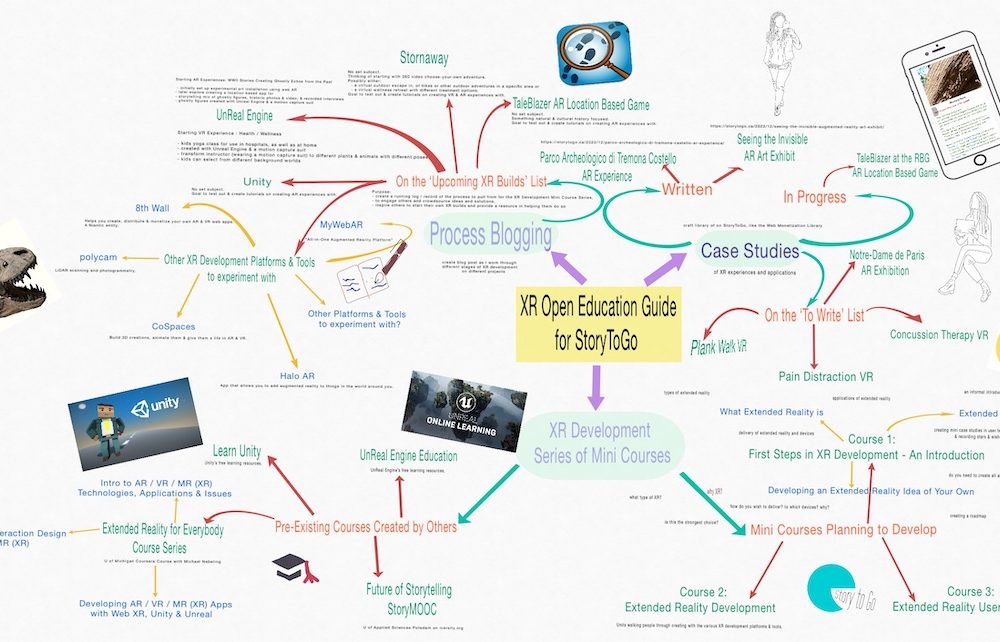
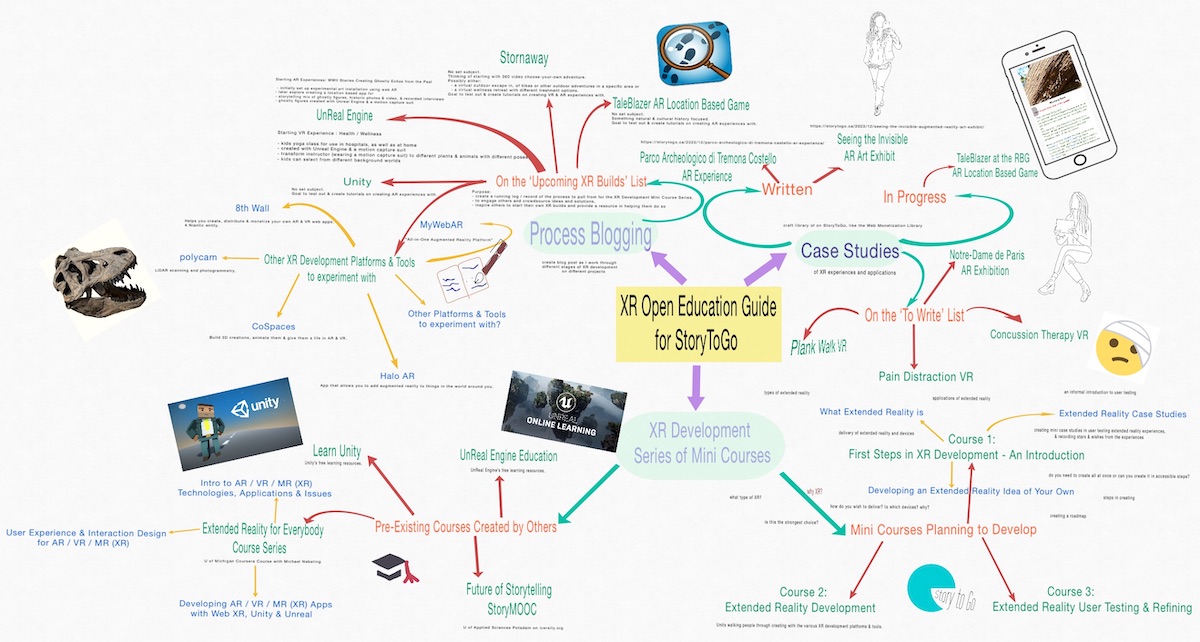
Here’s where I am at present in mapping out where I am going with this work:

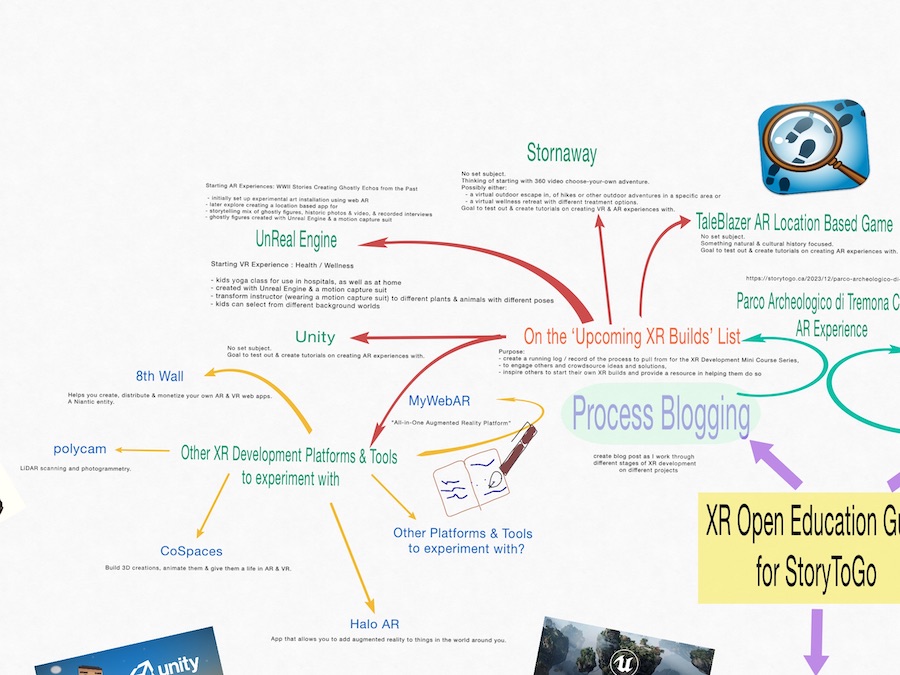
XR Open Education Guide for StoryToGo

As I continue to develop an XR Open Education Guide on StoryToGo, much as I did with the Web Monetization Guide, there are 4 main areas that I will be focusing on, developing, and building upon over time:

  • XR Case Studies
  • XR Development Experiments and Process Blogging
  • XR Development Series of Mini-Courses
  • Addressing Accessibility in Extended Reality

XR Case Studies

The goal of the Extended Reality Case Studies is to explore different extended reality experiences and applications to discover what resonates with myself and my team and to identify the challenges. By writing these up as case studies, the hope is to create a resource for our team in developing extended reality experiences, and to share that resource more broadly with other independent creatives, educators and students wanting to explore extended reality. Secondarily, these XR Case Studies will also be used as resources and examples within the XR Development Series of Mini-Courses.

At present, these XR Case Studies are focused around augmented reality (AR) natural and cultural history experiences and virtual reality (VR) health and wellness experiences, as these are the areas that my team and I are currently developing extended reality projects. Over times, we will broaden these case studies to other areas of interest.

Extended Reality Case Studies

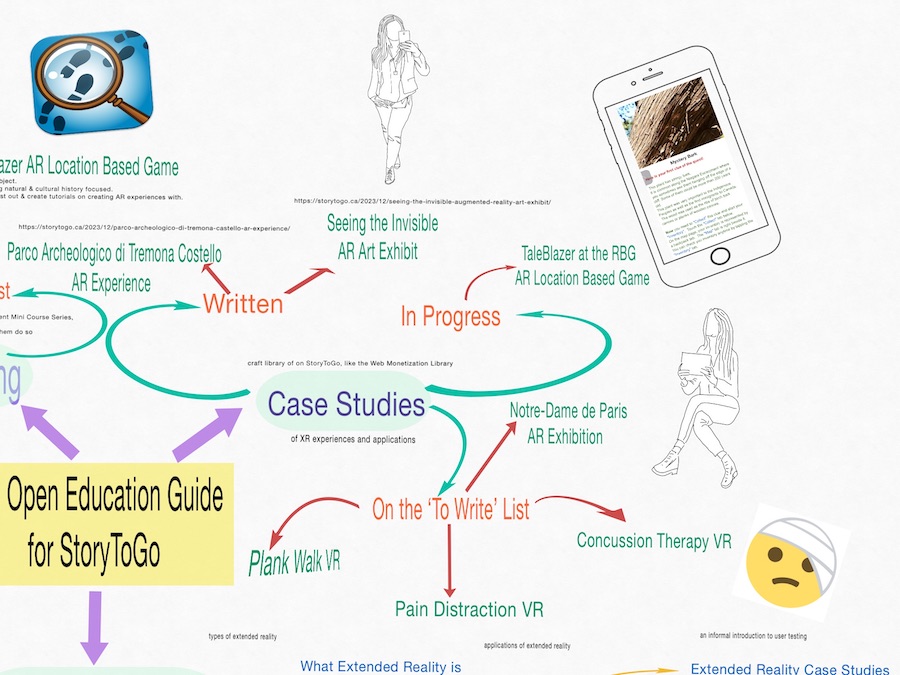
As my team’s and my current priority is on AR natural and cultural history experiences, the current case studies include:

  • Parco Archeologico di Tremona-Castello AR Experience
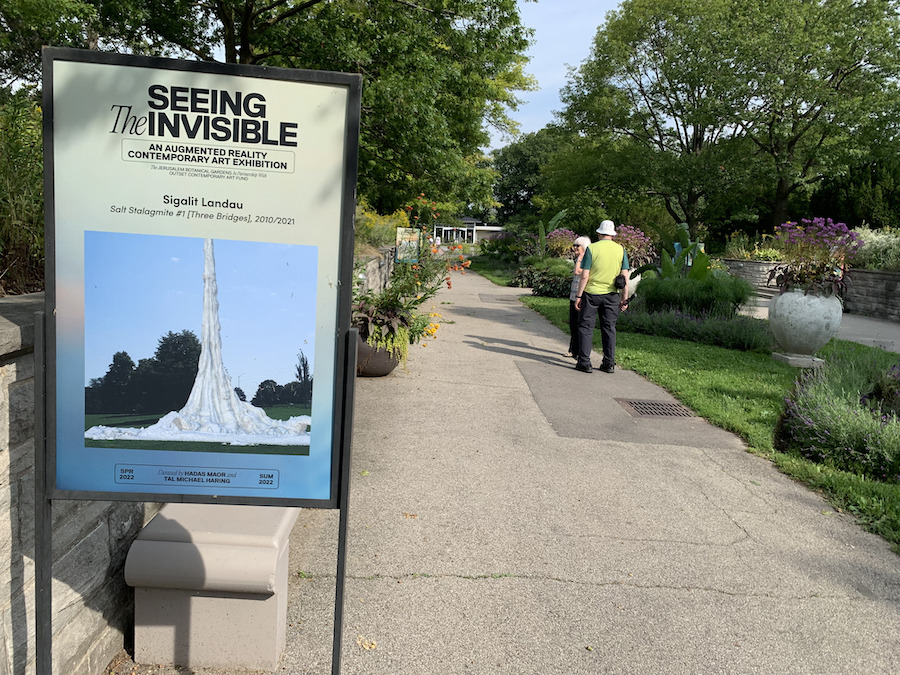
  • Seeing the Invisible Augmented Reality Art Exhibit

I am also writing up a case study on the TaleBlazer AR Game at the Royal Botanical Garden’s Rose Garden at present.

Other XR Case Studies on the current ‘to write’ list, include:

  • Notre-Dame de Paris, The Augmented Exhibition
  • Plank Walk VR
  • Pain Distraction VR
  • Concussion Therapy VR

As the XR Case Studies grow in number on StoryToGo, we will create an Experiential Reality Library, like the Web Monetized Content Library that we’ve begun to create.

XR Development Experiments and Process Blogging

As an indie creative who likes experimenting with emerging ways of crafting stories, I find it helpful to experiment with the technology for building those stories. That way even if we contract a larger team on our builds, I know what I am talking about and know what is possible. Often as I dive into such experiments, I also learn that building stories in these newer ways with emerging technologies is not so daunting, cost prohibitive, and inaccessible as people think. Thus, as I create and experiment with extended reality development, using different extended reality development tools and platforms, I intend to create process blogs walking people through the ‘how to’ of my experiments creating with different technologies.

The purpose?

  • to create a running log / record of the process to pull from for the XR Development Series of Mini Courses;
  • to engage others around this process, and crowdsource ideas and solutions; and
  • inspire others to experiment with their own XR builds, and provide them with a resource to helping them do so.
Extended Reality Development Experiments and Process Blogging

Currently my goals for my own projects involve Unreal Engine and motion capture technology. This, however, is not the most accessible entry point for educators and students wanting to begin their own experiments with XR, both in terms of the learning curve and in terms of the expense of the technology needed for. As such, I decided for the purposes of creating a more accessible entry to extended reality for teachers and students, that I want to begin with some more accessible extended reality builds / development ideas, and then build towards the more involved pieces using UnReal Engine and Unity, as part of my long term, on-going work.

What this means, is that my initial AR build will be with TaleBlazer to create some early development options within the open Extended Reality Course that are designed for teachers and students, and then later build Units on developing with UnReal Engine and Unity, as well as other more accessible extended reality development solutions, like Stornaway.io, CoSpaces, Halo AR, polycam, MyWebAR, and 8th Wall. If you have other suggestions of XR development tools and platforms that my team and I should be experimenting with, please let me know about them in the comments on this post.

In terms of the extended reality projects that my team and I have been developing, they include:

  • WWII stories from my friend Manami Calvo (Saito)’s family from their experience as Canadians of Japanese ancestry, living on the West Coast in WWII
    • our plan for this is to create some initial experimental ‘art installations’ using Web AR, that are accessible via smartphones and tablets
    • we plan on creating these utilizing animated ‘ghostly figures’ created with Unreal Engine and a motion capture suit, along with historic photos and video, as well as recorded interviews
    • we will then use those art installations to go after proper funding to further development

  • health / wellness VR Experiences
    • our plan is to start with a kids yoga class in VR that can be used in hospitals, as well as at home
    • create in Unreal Engine with a motion capture suit
    • the yoga will be lead by Lori Yearwood (wearing the motion capture suit) and will involve her transforming to different plants and animals with different poses
    • the children will also be able to select the background world (from a variety of calming choices) for their yoga experience

XR Development Series of Mini-Courses

To make things as easy as possible for other indie creatives, educators and students to begin to explore and develop their own extended reality projects, I intend to take what I have learned through my extended reality research, case studies, experiments and process blogging, and build a series of Extended Reality Mini-Courses for people to use as a guide in creating their own extended reality projects. The goal here being to remove the fear of extended reality being a far reaching, inaccessible goal by building their understanding of extended reality, getting them experimenting with it and envisioning the possibilities, and sharing with them a variety of pathways to creating extended reality, including step-by-step guides.

Extended Reality Development Courses

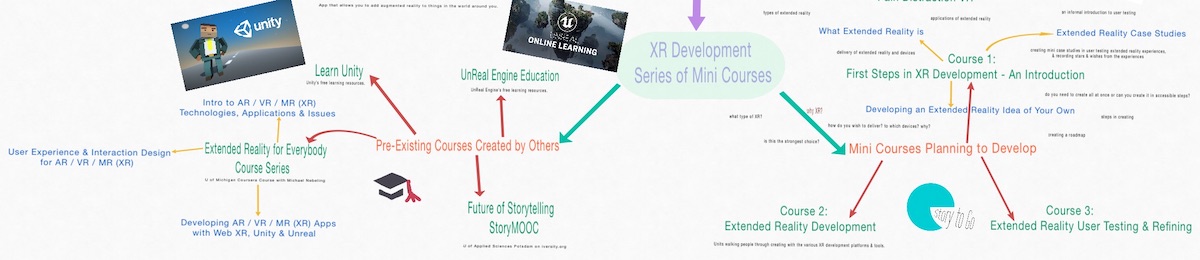
In developing a series of Extended Reality Mini-Courses, I am exploring other Extended Reality Learning Resources to see what is currently available to those wishing to explore extended reality further, so as best to identify a different, unique approach to the subject and include any beneficial resources that are currently missing.

The Extended Reality Learning Resources that I am currently delving into, include:

  • Extended Reality for Everybody Specialization by Michael Nebeling of the University of Michigan on Coursera
  • The Future of Storytelling StoryMOOC by the University of Applied Sciences Potsdam on iversity.org
  • Unity Learn
  • Learn UnReal Engine
Pre-Existing Extended Reality Courses

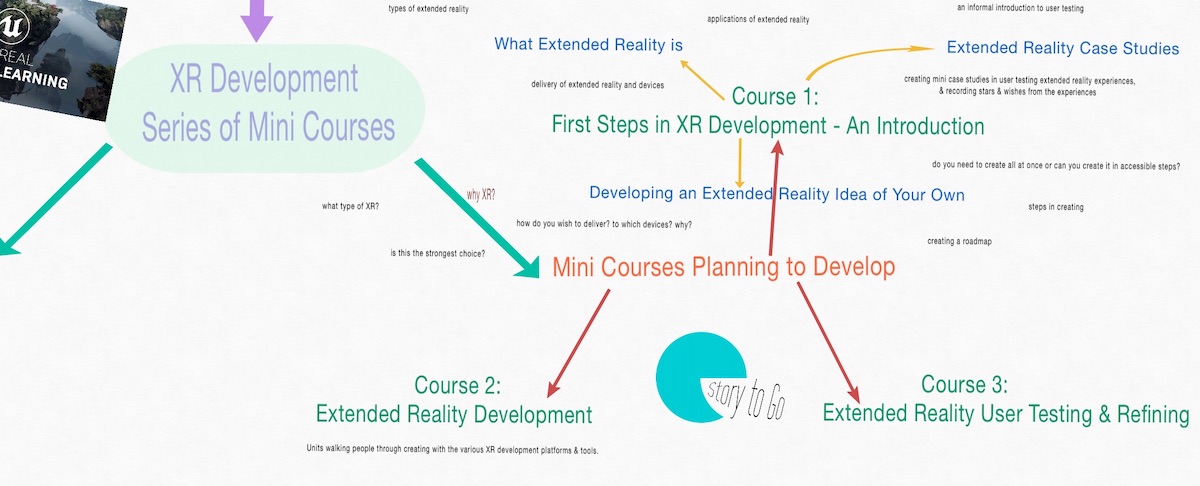
In approaching the extended reality course development for the StoryToGo Classroom site, I have come to the conclusion that XR development is more manageably approached as a series of mini-courses. Currently, I am thinking in terms of building the following three courses:

  • First Steps in Extended Reality Development – An Introduction
  • Extended Reality Development
  • Extended Reality User Testing and Refining

The talk I gave for the class at the American University in Cairo follows the layout for the first mini-course: 

My current breakdown for ‘First Steps in Extended Reality Development – An Introduction’ will include:

  • What Extended Reality Is
    • types of Extended Reality
    • applications of Extended Reality
    • delivery of Extended Reality and Devices

  • Extended Reality Case Studies
    • an informal introduction to user testing
    • creating mini case studies in user testing extended reality experiences, and recording stars and wishes from the experiences
  • Developing an Extended Reality Idea of Your Own
    • Why XR?
      • what type of XR?
      • is this the strongest choice?
      • how do you wish to deliver? to which devices? why?
    • Do you need to create all at once or can you create it in accessible steps?
    • Steps in creating
    • Creating a roadmap

Then the Extended Reality Development Course will be a continual work in progress, adding different Units, covering how to build XR with different extended reality development solutions, starting with TaleBlazer.

Extended Reality Mini Course to Develop for StoryToGo

If you have suggestions for the structure of or things I should be including in the XR Development Series of Mini-Courses, please share your thoughts in the comments.

Addressing Accessibility in Extended Reality

While not a standalone piece on my brainstorming document, for those of you who have begun to read our XR Case Studies, you may have recognized that accessibility in extended reality is central to my team’s and my explorations and development goals. This is very much driven by various disabilities and health and wellness issues that my team and I have experienced, but is also an aspect of extended reality design and user testing that has not been discussed and addressed as well as it should yet.

For now, my team and I intended to address Accessibility in Extended Reality throughout our case studies, process blogging, and course materials. I also had an invitation to come on as an advisor on accessibility to UBC’s Emerging Media Lab, after I brought accessibility and my perspective on with a few of the students at their Autumn Showcase. This is an invitation I intend to follow up on this year, with the hope that between that and my own team’s process thinking through accessibility in extended reality, as we share extended reality case studies, work on our own extended reality development and process blog on it, and create our Extended Reality Development Series of Mini-Courses, that we also begin to build a standalone piece or pieces that address accessibility in extended reality. Not sure what that will be yet, but if you have suggestions for this, I’d love to hear about them in the comments.


Your Thoughts?

I’d love to hear your thoughts in comments below on the direction I am taking with this Extended Reality Open Education Guide. If you have suggestions for future XR Case Studies, on XR Development Tools and Platforms to try, the structure of or things I should be including in the XR Development Series of Mini-Courses, or ways to further address Accessibility in Extended Reality, please share them in the comments. Thank you!

Also, if anyone wishes to become involved in any of the above endeavours with myself and my team, please reach out and we can chat further.


Thank Yous

Thank You!

The work that I have begun here has been inspired by and is evolving, thanks to:

  • Dr David Vogt for encouraging my dreaming, entrepreneurial thinking, and edtech product design and development;
  • Dr David Porter in exploring open education and searching for sustainable funding pathways for;
  • Saeed Dyanatkar for seeing my potential in dreaming up different pathways for storytelling and education, always making time for me when I had questions, and making me feel welcome and valued whenever I wandered into the Emerging Media Lab;
  • Dr Kyle Stooshnov and Juliana Loh for creating a framework for my first steps into thinking about XR development and experimenting with 360 video;
  • Dr Jennifer Jenson and Dr Suzanne de Castell for fostering my game design thinking;
  • Dr Heidi Janz, Dr Michelle Stack and Dr Paul Hamilton for helping me to process my newer disabilities, frame disabilities and myself as disabled in my storytelling, and begin to understand how to advocate for disability and accessibility in education (and feel empowered to do so, understanding it as a strength, as oppose to something to hide);
  • Yvonne Dawydiak for demonstrating the alternative pathways to navigating UBC, approaching teaching creatively in a hands-on way, and an empathy driven approach and practice;
  • Lori Yearwood for her vision in beginning to create case studies here on StoryToGo to act as resources for our students, workshop participants, clients and partners, and the broader independent creative and education community – for encouraging me to begin to share my disabilities in our storytelling and work, and sharing her own wellness challenges as we began to build our health, wellness and accessibility workshops, resources, and storytelling – and for always being a willing and enthusiastic supporter and co-creator on the ideas that wander through my mind; and
  • Manami Calvo for seeing the potential for sharing her family’s WWII stories in AR, joining me in crafting experiments around, and in trusting me with her family’s stories.

Also an enormous thank you to the Interledger Foundation for helping fund my research and work on Sustainable Funding Solutions for Creatives and Educators, and to CNIE – RCIÉ and BCIT who have helped fund my research and coursework throughout my Masters.

Thank you all, for all your help, support, direction and inspiration!

Filed Under: #StoryToGo, Accessibility, Case Studies, Courses, EdTech, Erica Hargreave, Extended Reality, Immersive and Interactive Media, Storytellers, XR Tagged With: Extended Reality, XR, XR Development

Seeing the Invisible Augmented Reality Art Exhibit – an Extended Reality Case Study

December 27, 2023 by Erica Hargreave 4 Comments

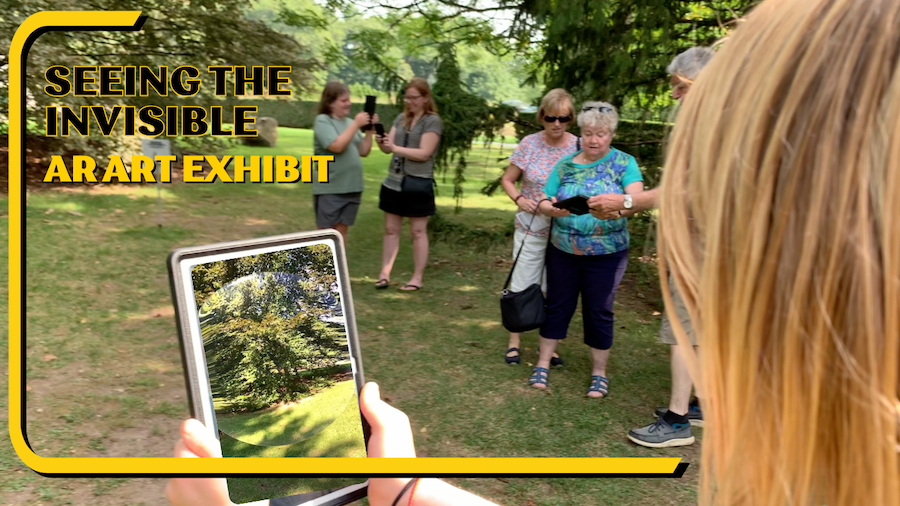
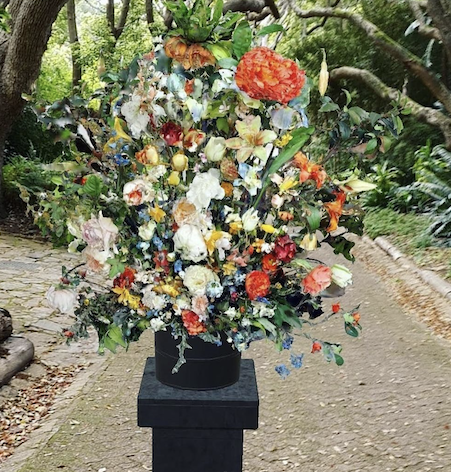
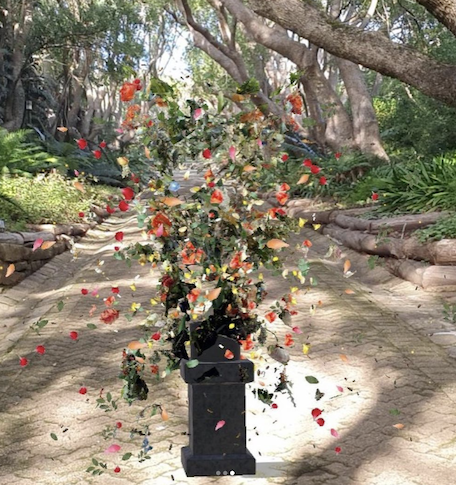
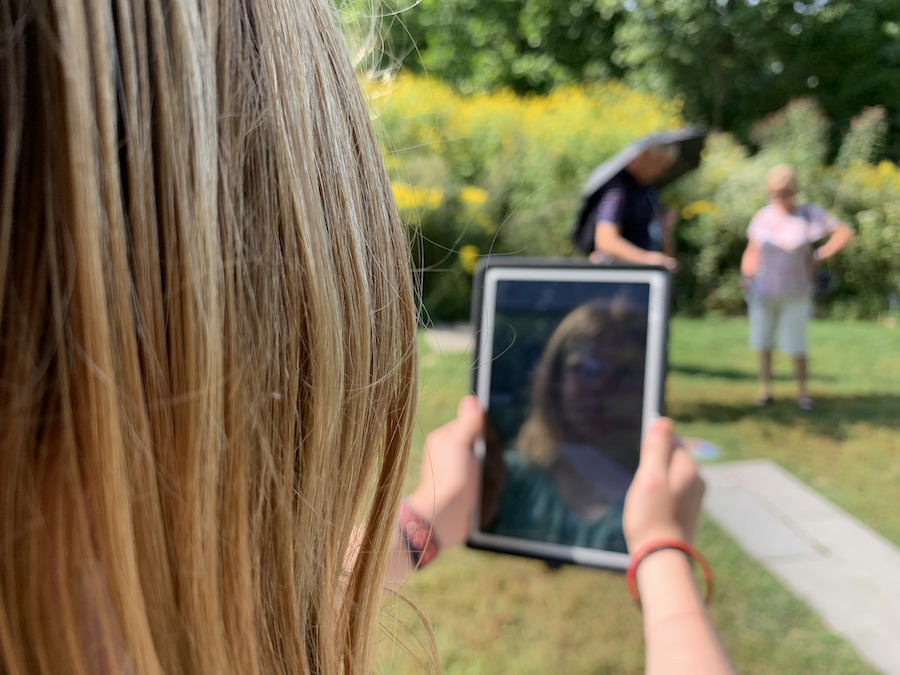
Garden visitors taking in the Seeing the Invisible AR Art Exhibit.

In this second case study in our series exploring extended reality (XR), we examine the Seeing the Invisible Augmented Reality (AR) Art Exhibit, as exhibited by the Royal Botanical Gardens. This AR art exhibition featuring the art of 13 artists from around the world was initiated by the Jerusalem Botanical Gardens and displayed concurrently at 12 Botanical Gardens worldwide.


Project:

Seeing the Invisible Augmented Reality Art Exhibit

Initiated By:

Jerusalem Botanical Gardens in partnership with Outset Contemporary Art Fund, with the support of the Jerusalem Foundation

Curated By:

Hadas Maor and Tal Michael Haring

Host At:

Royal Botanical Gardens (RBG)

Type of Experience:

Augmented Reality (AR) Outdoor Art Exhibition

Device for Experiencing:

Smartphone or Tablet, preferably with headphones

Link to Project:

https://seeingtheinvisible.art/

Date Partook in the Experience:

September 18, 2022

Country of Origin:

Israel

Country Where I Experienced:

Canada


Reflections On My Experience


Interview Between Tucson Botanical Gardens Executive Director Michelle Conklin & Seeing The Invisible Curators Hadas Maor & Tal Michael Haring


The Project:

In 2021, as the world continued to face the pandemic and many art galleries were closed to the public, an idea was fostered out of the Jerusalem Botanical Gardens to host an outdoor art exhibit, but not in the usual sort of way. Rather an invisible art exhibit, at least to the naked eye, and one that was concurrently displayed in 12 gardens worldwide with the same pieces of original art. “How?”, you ask. With augment reality (AR), creating the first such multi-location, simultaneous art exhibition of its kind with a number of artists, many of whom were new to AR, creating their first pieces in augmented reality.

Some of the goals of this exhibition were to:

  • give visitors something new to enjoy in gardens at times of year when plants may not be blooming
  • complement the natural setting with the AR art, encouraging visitors to experience it in a new way
  • give people a way to enjoy art in a shared, yet outdoor setting
  • encourage visitors to the gardens to engage with the gardens and with the art
  • collaborate with other gardens worldwide
  • create an exhibition without disturbing the gardens themselves, and keeping the carbon footprint to a minimum

The art exhibition was also designed to address shared themes of “nature, environment, and sustainability, exploring the boundaries and connections between art, technology, and nature. Both bleak and hopeful, each artwork offering a unique perspective on unresolved issues, creating thought-provoking, experiential, and contemplative spaces for viewers to immerse in.”

View this post on Instagram

A post shared by @seeing.the.invisible

The artwork and artists crafting this narrative included:

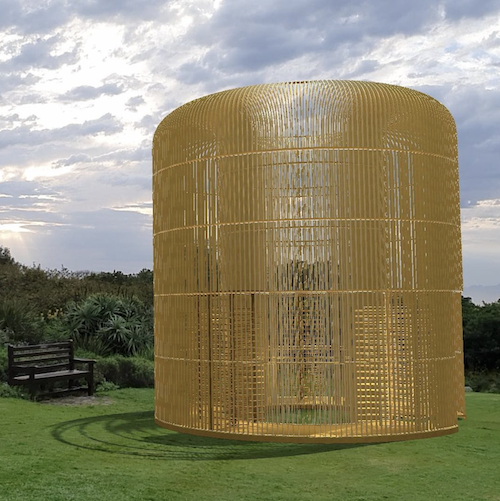
  • Gilded Cage AR (2021) by Ai Weiwei
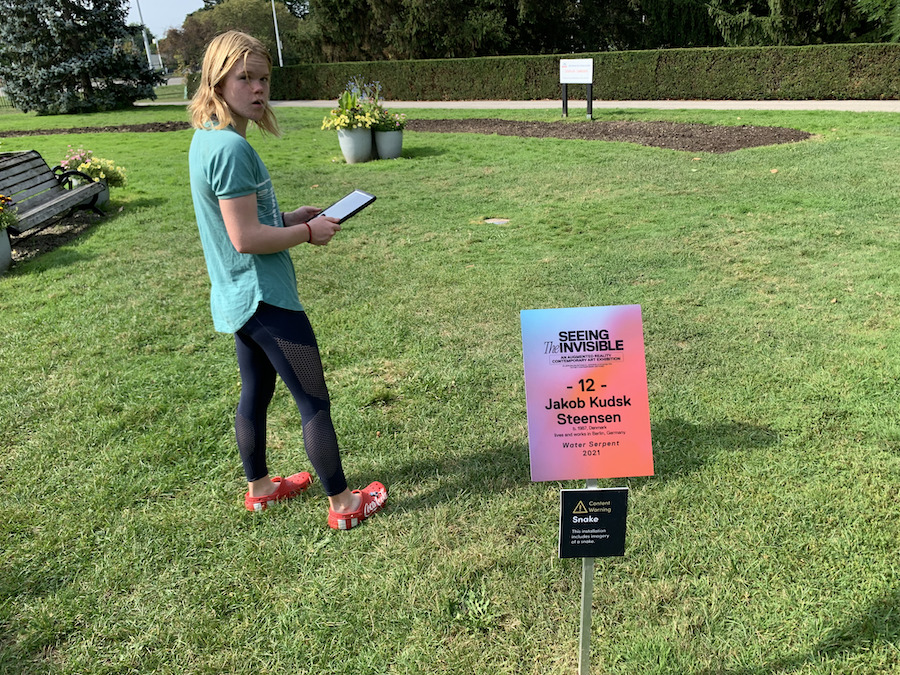
  • Water Serpent (2021) by Jakob Kudsk Steensen
  • Dawn Chorus (2021) by Sarah Meyohas
  • Biome Gateway (2021) by Timur Si-Qin
  • Stones Against Diamonds (Ice Cave) AR (2015 / 2021) by Isaac Julien
  • Forget Me Not (2021) by Ori Gersht
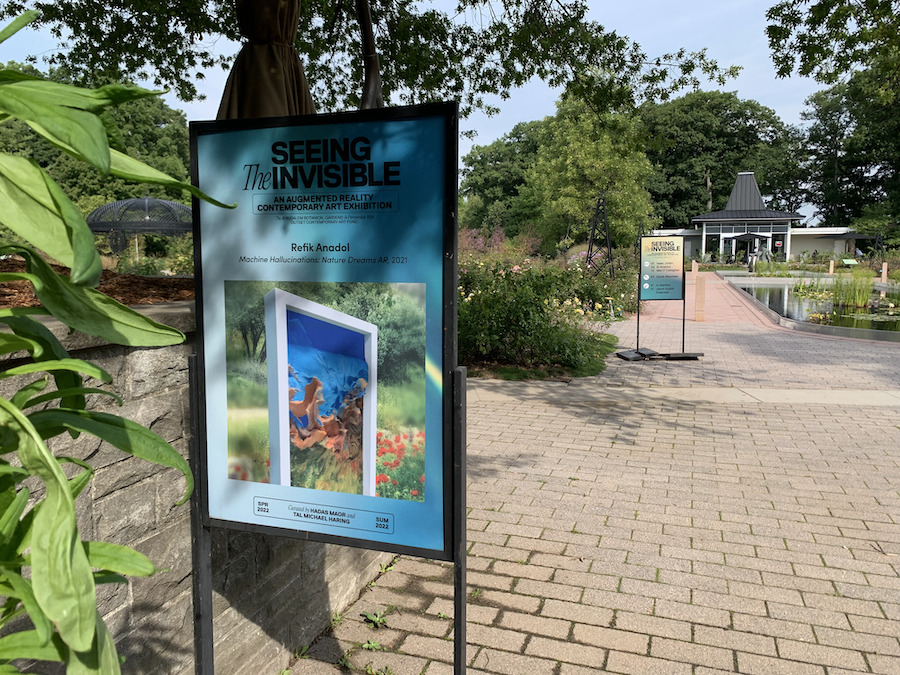
  • Machine Hallucinations: Nature Dreams AR (2021) by Refik Anadol
  • AG + BA [AR] (2014 / 2021) by El Anatsui
  • Anamazon [Limb] (2021) by Pamela Rosenkranz
  • Morphecore Prototype AR (2021) by Daito Manabe
  • Directions Zero (2010 / 2021) by Mohammed Kazem
  • Pneuma (2021) by Mel O’Callaghan
  • Salt Stalagmite #1 [Three Bridges] (2021) by Sigalit Landau
  • Nea Zoi (2022) by Loukia Alavanou

Despite the art exhibition taking place concurrently in a number of different gardens, the experience is different in each garden, as the works are augmenting the unique surroundings and context of each garden.

Why Augmented Reality?

Building and purchasing sculptures and other art installations is a pretty major undertaking for a botanical gardens, and a travelling exhibition can generally only visit one garden at a time. While not without a cost, by making this art exhibition simultaneously available in a number of botanical gardens, this makes the cost of such an art exhibition less prohibitive. The fact that this art exhibition is accessible through augmented reality via digital devices, makes it possible to ‘install the pieces’ temporarily in multiple gardens at the same time.

View this post on Instagram

A post shared by @seeing.the.invisible

The initial launch of this AR art exhibition during the pandemic was well timed to offer an alternative outdoor way to enjoy art, outside the enclosed space of an art gallery, and further encouraged visitors to think about botanical gardens as arts spaces, as well as nature spaces.

The curators of Seeing the Invisible talk about the importance of this AR art exhibition being phygital, a blending of a digital experience with a physical one. Thought was put into where each artwork was placed in each garden to enhance both the artwork and the garden, as well as take visitor safety and the protection of the planted exhibitions into consideration. The AR artwork, through the Seeing the Invisible app, was geotagged to specific locations in the gardens they were exhibited in, and visitors could only experience the artwork in that location, and only in those gardens. Thanks to the phygital, the experience was unique in each garden.

The Augmented Reality Experience

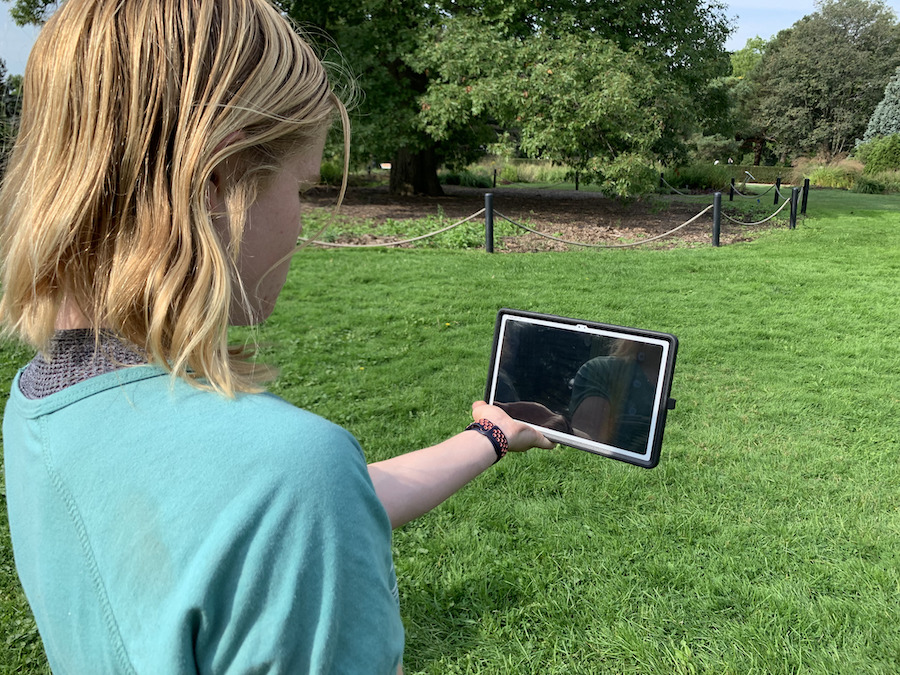
The Seeing the Invisible artwork is experienced at the gardens hosting this AR art exhibition through visitors’ smartphones and tablets via a GPS triggered app.

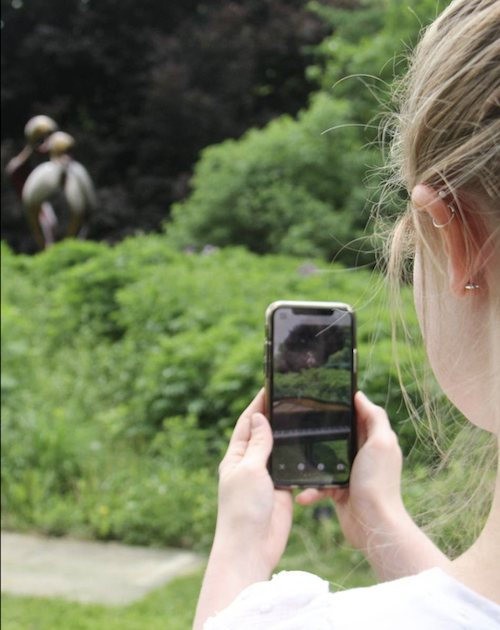
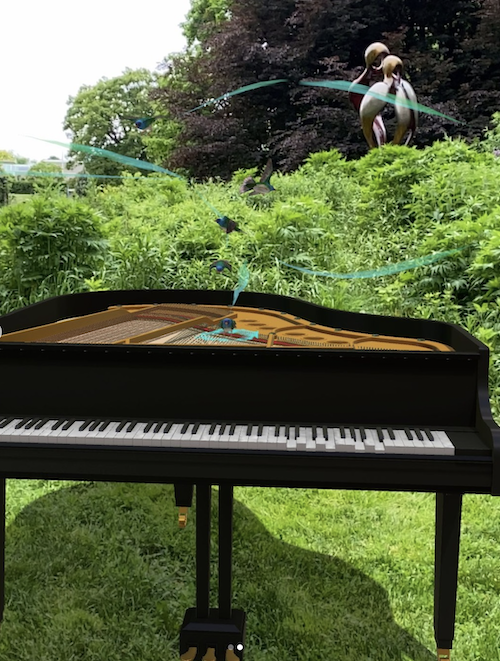
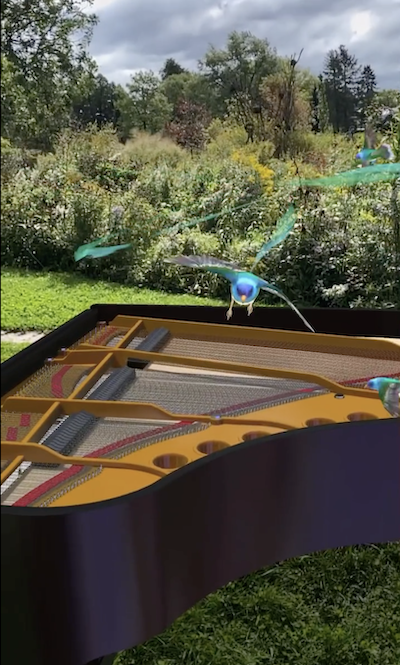
Viewing AR art, Dawn Chorus, through a smartphone.

To see and experience these dynamic and engaging pieces of artwork, people visiting the gardens hosting this AR art exhibition need to:

  • Before visiting a Gardens hosting the AR art exhibition:
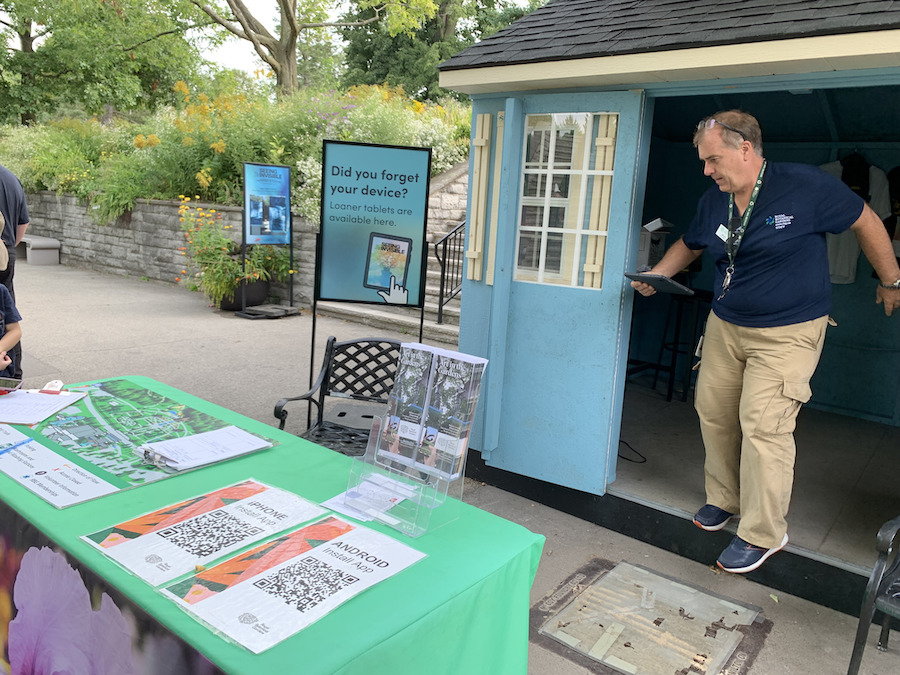
    • Download the Seeing the Invisible App to the smartphone or tablet with cellular capabilities that they will be using at the AR art exhibition.
    • Allow the app access to device’s camera and microphone.
    • Fully charge the device before visiting the gardens.
    • Take earbuds or headphones compatible with the device to the gardens with you.
  • At a Gardens hosting the AR art exhibition:
    • If you don’t have a smartphone or tablet, you can borrow one on site.
    • Follow the map in the app to the different pieces of AR art within the gardens.
    • Follow the Seeing the Invisible App’s instructions at each piece of AR art, scanning the ground where the piece of art has been virtually installed until the art virtually appears.

The Royal Botanical Gardens shares further tips on enjoying Seeing the Invisible Art Exhibition in their gardens, here.

Once the art virtually appears before you, visitors are encouraged to engage with it and fully immerse themselves in it, by listening through their headphones to the experience, and walking around the artwork and even into it. Visitors can also take pictures with the virtual art and read more about the art through the app.

Each piece of art, lends to different forms of engagement. For instance with:

  • Gilded Cage: You can walk into the labyrinth of cells.
View this post on Instagram

A post shared by Royal Botanical Gardens (@rbgcanada)

  • Dawn Chorus: Birds swoop around you as you are drawn in by the music from the piano.
View this post on Instagram

A post shared by @seeing.the.invisible

  • Biome Gateway: You can walk into the temple cave, and discover a portal to walk through and into a parallel landscape.
View this post on Instagram

A post shared by @seeing.the.invisible

  • Forget Me Not: By moving toward the flower arrangement, you trigger a gun to propel a bullet through the flower arrangement causing it to explode outwards. Once the explosion has occurred, if you walk around the vase, you will hear three different scholars discussing the flower arrangement.
View this post on Instagram

A post shared by Royal Botanical Gardens (@rbgcanada)

  • Pneuma: By walking into the sphere, you see the gardens around you through the distortion of being inside a bubble, while the sound of breathing acts to change your own breathing pattern while experiencing.
View this post on Instagram

A post shared by @seeing.the.invisible

Morphecore Prototype AR even inspired a dancer to choreograph their own piece to dance along with. Other host Gardens similarly witnessed many of their visitors dancing along with the Morphecore Prototype.


My Reflections on this Augmented Reality Experience

One of my goals in exploring different extended reality experiences is to discover what excites me in these experiences and what I find challenging, in order to reflect on what could create even richer and more accessible extended reality experiences.

Here are my thoughts on the Seeing the Invisible AR Art Exhibition, from when I visited it in September of 2022 at the Royal Botanical Gardens.

Signs welcoming visitors to the Seeing the Invisible AR Art Exhibition at the Royal Botanical Gardens.

The Extended Reality Magic

This is a clever idea to get visitors exploring the gardens through a new lens, allowing the augmented reality art to spark their imagination in a new way, to perceive the gardens differently, and to provoke thought pertaining to nature, technology and art.

Some art, like Dawn Chorus, brought pure joy of the fantastically, magical whimsy that augmented reality brings with it, further adding beauty to the surrounding gardens.

AR birds flying around an augmented reality piano in a real world garden.
AR birds flying around an augmented reality piano, care of Dawn Chorus, in a real world garden.

Other art, like Pneuma, made you feel as though you’d stepped out of reality and were peering back in at it.

AR Art looking back at the gardens through the distortion of the augmented reality bubble created by Mel O’Callaghan's Pneuma.
Looking back at the gardens through the distortion of the augmented reality bubble created by Mel O’Callaghan’s Pneuma.

While other art, like Gilded Cage, got you questioning our problematically omnipotent and controlling relationship with nature from the perspective on an artist who was imprisoned.

AR art, Ai Weiwei's golden Gilded Cage, casting augmented reality shadows, by a park bench in a real world garden.
AR art of Ai Weiwei’s golden Gilded Cage, casting augmented reality shadows by a park bench in a real world garden.

Best of all, the gardens discovered that people of all ages wanted to engage with the art, even dancing along to Daito Manabe’s Morphecore Prototype AR.

A real world dancer at Jerusalem Botanical Gardens dancing alongside Daito Manabe's Morphecore Prototype AR.
A real world dancer at Jerusalem Botanical Gardens dancing alongside Daito Manabe’s Morphecore Prototype AR.

Logistically the GPS triggered app is a good idea to create a curated experience within each garden, and to host this simultaneously between different gardens.

Adding in the ability for visitors to be able to photograph the AR art through the app, added in the ability for visitors to have fun engaging with the art. This also added to crowdsourced storytelling around the exhibit, which I can only imagine was beneficial to marketing the exhibition.

Visitors at a number of gardens playing with Pneuma selfies.

I’d love to experience future such AR art exhibitions at the Royal Botanical Garden, as well as to experience the Seeing the Invisible Art Exhibition in different gardens to see how the experience differs between the gardens with the same art.

Current Challenges (as of 2022 Experience)

Excited to experience the Seeing the Invisible Art Exhibition at the Royal Botanical Gardens in Burlington, Ontario, my niece and I followed the instructions and downloaded the Seeing the Invisible App to our smartphones before heading to Hendrie Park to enjoy the exhibit together.

Seeing the Invisible at the Royal Botanical Garden's Hendrie Park.

The only problem, when we got there, the Seeing the Invisible App didn’t work on either of our smartphones, despite both having compatible technology. Not sure if this is the reason why, but one woman told us the issue was due to the strength of the wifi signal from your data provider.

No problem, we queued to borrow one of tablets that the gardens had available for visitors that needed it.

Borrowing a loaner tablet at the Royal Botanical Gardens.

While the borrowed tablet worked, this now meant that we were now sharing a device, our headphones didn’t work in the borrowed device, and the borrowed tablet had a screen protector over it, that made the AR more difficult to see, especially in sunny areas. Added to this, almost every piece of AR art was placed in a sunny area, and it was hot, so not only were we battling with the light to see the AR art through the screen, but needed shade for respite for the sun.

I assumed that this user experience oversight was down to this being the Royal Botanical Garden’s first AR Exhibition and them not being familiar enough with the technology to understand how to create a positive user experience, but it turns out it was actually the curators that mapped out where each piece would be placed. Maybe the oversight of the sun was made, as due to the pandemic, the curators did not visit Hendrie Park before deciding where to place the AR art, but either which way, this emphasizes the importance of taking the user experience into consideration when designing AR exhibitions. Shade is important, both for the visitors’ physical comfort and for the practicality of visitors actually being able to properly see and experience the AR art work through their screens. With the size of the Royal Botanical Gardens there is more than enough options to place these 13 pieces of artwork in a way that keeps visitors out of the full sun and allows them to better see and experience the AR art on their screens.

Girl holding a tablet, demonstrating the difficulty seeing the AR art in the sun.

While certainly the audio experience would have been much better had we been able to use our headphones, as people do experience exhibits like this on a shared device, I think it would be beneficial for the audio portion of the experience to be added at a higher volume to better allow for visitors sharing a device to be able to hear the experience.

I appreciated that the artist shared a write up on their art within the app, but to spend time reading this, it takes you away from viewing and experiencing the AR art. It would be great, if visitors have the additional option to play an audio recording of the artist sharing their thoughts with visitors on the piece of art.

Finally, with the loaned tablets, it would be beneficial if the individual gardens made it possible for visitors to email themselves the copies of any photos they shot with the AR art.

Takeaways From This Extended Reality Experience

When easily visible and heard, the Seeing the Invisible Art Exhibition creates a glimpse into a hidden world that encourages thought and exploration through a new lens and perspective. Thats exciting, and demonstrated what excites me about sharing stories with augmented reality.

However, if the app isn’t working on people’s devices or the AR is difficult to see on people’s screens, then people become frustrated, rather than excited by the experience. This is why user design and testing is so very important. This should be thought of both in terms of the technology and visitors’ interactions with the physical environment in which they are experiencing the AR art. In the case of the RBG, the gardens and not trampling plants seems to have been taken into considerations, but not visitors’ physical comfort from the sun or thought of how that sun would impact user’s experience. This art exhibition was almost in its entirety in direct sun with no to very little shade.

A girl in another full sun AR art exhibit spot at the Royal Botanical Gardens.

User testing should be inclusive of the loaner tablets for visitor use, made available onsite. This means, if adding protective screen covers to the tablets, making sure those protective screen covers do not hinder visitors’ ability to enjoy the AR art.

It would also be advantageous to allow people using the borrowed tablets to be able to email themselves any pictures they took with the AR art, or if that is not possible, to be upfront with visitors about that from the start, so as not to leave them disappointed at the end of the experience.

Summary of Takeaways:

  • The technology exists to create a GPS triggered augmented reality app that works on people’s devices without overloading a device’s data.
  • The Seeing the Invisible AR App takes up 2.1 GB of space on my smartphone.
  • The Seeing the Invisible AR App was developed by Khora ApS, a virtual reality and augmented reality production studio in Copenhagen.
  • When the AR app is working, the augmented reality art exhibition creates wonder for visitors, gets visitors exploring and interacting in a new way, and has visitors engaging with the AR art.
  • By making the AR art exhibition viewable through smartphones and tablets (with loaner tablets available for use), it is accessible to all ages and most abilities.
  • User testing is important on the site of the experience, thinking about user comfort at different times of year.
  • Avoid creating GPS triggered AR screen experiences in direct sun.
  • Make sure protective screen covers on loaner tablet do not limit the ability to see the augmented reality.
  • Think about user safety and comfort when placing GPS triggered AR experiences.
  • Encourage visitors to bring headphones, while ensuring sound is available at a volume that those without headphones or sharing a device can hear.
  • People enjoy interacting with AR art.
  • Make sure people can email themselves any pictures they took with the AR art on loaned tablets.

Future Building

In reflecting upon the Seeing the Invisible AR Art Exhibition, in addition to placing the augmented reality art in spaces that people can enjoy the art in the shade and to be better able to hear the accompanying sounds when experiencing through a shared device, I’d also love to further encourage the engagement that people enjoyed with the art. Some possible ideas for that:

  • I’ve recently seen how the Relive App makes it easy to create videos from a walk by recording the map and editing in the photos and videos you take at different stops. Should this be possible within this AR app, it could create fun keepsakes from the AR experience, that also become valuable crowdsourced storytelling for the exhibit. An example from the travels of a fellow member of Vancouver’s tech community:
View this post on Instagram

A post shared by Shane Gibson (@shanegibson)

  • It would be great to be able to play the artist’s description of their work as an audio reading, complete with some prompts to encourage people to engage with their art in different ways.
  • I loved how Ori Gersht’s Forget Me Not was responsive to visitor’s movements, it would be exciting to have more pieces that respond to the location of the holder of a device.
Ori Gersht's Forget Me Not AR art flower arrangement.
Exploding vase of flowers, as a part of Ori Gersht's Forget Me Not responsive AR art.

The educator in me has also begun to design, in my head, a scavenger hunt that encourages visitors to collect experiences and different perspectives with each piece of art by encouraging visitors to take on some sort of challenge or unravel some sort of mystery with each piece of art. Being able to create a mapped storytelling account of such a scavenger hunt, in a format like the Relive App creates, would be a great way to further share the discoveries from such a scavenger hunt.

The storyteller in me would also love to learn more about the making of the art, like with this talk on Ori Gersht’s and Timur Si-Qin’s AR art pieces.


What’s Your Take on this Augmented Reality Experience?

I’d love to hear your thoughts in comments below on what you think would make this a richer and more accessible AR experience, and if you have technical solutions for making this a more immersive and user friendly experience.

One visitor using an umbrella to improve his AR art experience at the Seeing the Invisible Art Exhibition at the RBG, with all the sun.
One visitor using a black umbrella to improve his AR art experience in the sun.

References

Conklin, M., [Tucson Botanical Gardens], Maor, H., & Haring, T. (2022, December 1). A Talk with the Curators of Seeing The Invisible [Video]. YouTube. https://www.youtube.com/watch?v=1BXqc0g8D_c

Horwitz, L. (2023, June 12). phygital. Customer Experience. https://www.techtarget.com/searchcustomerexperience/definition/phygital

Jerusalem Botanical Garden. (2021, November 14). אחת העבודות בתערוכת האמנות, תפתיע אתכם במיוחד. . .. Jerusalem Botanical Garden’s Facebook Page. https://www.facebook.com/Jerusalem.Botanical.Gardens/videos/372403381331281

Rendell, H., Gertler, C., Katri, M., Maor, H., & Haring, T. (2021). SEEING THE INVISIBLE. SEEING THE INVISIBLE. https://seeingtheinvisible.art/

Royal Botanic Garden Edinburgh, Maor, H., Gersht, O., & Si-Qin, T. (2022, May 24). Seeing the Invisible  In Conversation with the Artists [Video]. YouTube. https://www.youtube.com/watch?v=3_XD4nmV-58

Royal Botanical Gardens. (2023, March 8). Seeing the Invisible – Royal Botanical Gardens. https://www.rbg.ca/things-to-do/art-in-the-gardens/seeing-the-invisible

Shamir, R., [America-Israel Friendship League], Gertler, C., Rendell, H., Maor, H., Haring, T., Rominiecki, J., & Firestone, W. (2021, November 8). Seeing the Invisible: Augmented Reality art [Video]. YouTube. https://www.youtube.com/watch?v=TIuxE1oZKtY

Filed Under: #StoryToGo, Art Therapy, Case Studies, EdTech, Erica Hargreave, Extended Reality, Immersive and Interactive Media, Storytellers, XR Tagged With: AR, art, augmented reality, Extended Reality, XR

Next Page »

Primary Sidebar

#StoryToGo is a community designed to reflect storytelling today – shared both through traditional means of oral storytelling, radio, film and TV, and print; in addition to newer forms of media storytelling through the digital arts, including gaming, blogging, online video, and social media.

Explore Past Posts


Tags

accessibility AI for filmmaking AI for videography AR art art therapy art therapy activities augmented reality BCIT clown crowdfunding crowdsourced Elementari elevator pitch Extended Reality FilmFreeway filmmaking game game based learning game design game development health and wellness home education improv inclusive design literacy NFT non-fungible tokens online learning open education phishing scam photography pitching poetry social media storytelling storyworlds sustainable funding universal design video game virtual conference virtual reality Web Monetization XR XR Development

On the Beat with StoryToGo

Follow along on StoryToGo’s digital magazine for our latest case studies, upcoming free courses and webinars, technology tips and tricks, story musings,  and our latest job boards!

  • Case Studies
  • Tech Tips
  • Events
  • Jobs
  • Our Community
  • Courses

Copyright 2012 © 2026 · Ahimsa Media · Log in